Ask for what you need. It plans, you approve, it ships — into your own isolated cloud of servers, databases and storage. Then every system it runs can be operated by conversation.
Run Servers · Deployments · Databases · Storage · Systems
Build Assistant · Agents · Workspaces
An example of the Assistant at work. You ask “Add a Redis cache to @crm-staging”. It reads what is running, answers with a three-step plan, you approve it, and it reports: @crm-redis-stg is running · @crm-api-stg switched with no gap.
Assistant@acme
Ask about Acme, or tell it what to build
Add a Redis cache to @crm-staging
Why is @payroll-api restarting?
/deploy@crm/api production
Import leads-q3.csv into @crm-agent
Add a Redis cache to @crm-staging
Read @crm-staging — 3 containers on crm-stg-net, no cache yet
Plan · Redis cache for stagingApproved
Deploy redis:8-alpine on crm-stg-netcrm-redis-stg
Give @crm-api-stg a REDIS_URL secretsecret v1
Redeploy @crm-api-stg beside the old onerolling
@crm-redis-stg is running · @crm-api-stg switched with no gap
@crm-redis-stg is running · @crm-api-stg switched with no gap
OOMKilled 3× since the 09:40 deployApply
Memory peaks at 508 MiB of a 512 MiB limit99%
The 09:40 build loads a whole payroll run at oncea1f9c2e
Raise the limit to 1 GiB now, fix the batch in a PRproposal
@payroll-api redeployed with 1 GiB · no restarts since
Deploy crm-api 2026.09.25 → productionDeploy
Pull the image and start it beside the running onerolling
Wait for GET /health to answerhealth check
Switch over — keep the old one to roll back torollback ready
Live on @crm-prod · it rolls back on its own if the check fails
1,380 rows → contacts.bulk_upsertImport
Email → emaildedupe key
Phone → phone_e164reformatted
Company → companymatched
1,284 created · 96 merged · 0 rejected
Create a Postgres 18 database with daily backups
Resize @vm-prod-1 to 8 vCPU on weekdays
Rotate STRIPE_SECRET_KEY on @crm-prod
Install n8n from the marketplace
Search the logs for 500s since the last deploy
Roll @crm-api back to yesterday’s image
Create a Postgres 18 database with daily backups
Resize @vm-prod-1 to 8 vCPU on weekdays
Rotate STRIPE_SECRET_KEY on @crm-prod
Install n8n from the marketplace
Search the logs for 500s since the last deploy
Roll @crm-api back to yesterday’s image
Connect acme/crm from GitHub and deploy on push
Share leads-q3.csv for 24 hours
Who changed secrets this week?
Snapshot @vm-prod-1 before the upgrade
Publish @crm-agent to the registry
What did the servers cost this month?
Connect acme/crm from GitHub and deploy on push
Share leads-q3.csv for 24 hours
Who changed secrets this week?
Snapshot @vm-prod-1 before the upgrade
Publish @crm-agent to the registry
What did the servers cost this month?
app.talkingsuites.com/acme/home
Works with what you already run
GitHub
Docker
Model Context Protocol
PostgreSQL
MySQL
MariaDB
MongoDB
Redis
Elasticsearch
Meilisearch
Qdrant
ClickHouse
Neo4j
Ubuntu
Debian
Nginx
n8n
WordPress
Grafana
RabbitMQ
GitHub
Docker
Model Context Protocol
PostgreSQL
MySQL
MariaDB
MongoDB
Redis
Elasticsearch
Meilisearch
Qdrant
ClickHouse
Neo4j
Ubuntu
Debian
Nginx
n8n
WordPress
Grafana
RabbitMQ
19
database engines
in 9 categories, with backups
42
ready-made listings
apps and databases, installed as a stack you own
15s
between setup checks
a new server is watched until it is ready
10min
billing reconciled
every server and bucket tagged to its owner
/how-it-works
From a sentence to a running system. You approve what matters.
The same four steps whether you are adding a cache, shipping a feature or importing a spreadsheet — and every step leaves something you can read: a plan, a pull request, a deploy, a tool call.
Youask in plain words
01
Ask
Say what you need in plain words. Point at things with @handles; run exact actions with /commands.
Assistantreads the codePLAN.mdapproved by youSandboxagent, tests, review
02
Plan, approve, build
It reads the code and what is running, writes a PLAN.md and waits for you. Then a coding agent builds it in a sandbox, with tests and review.
Containerhealth-checked deploy
03
Deploy
Each project ships as a container on your servers — from a push to GitHub or one click. Health-checked before it takes over; the old one stays up if it fails.
SystemMCP tools, ready to talk to
04
Talk to it
The system publishes its MCP tools, kept as the context an agent reads. Every call is checked, recorded and — when it changes data — confirmed.
The whole platform
Servers
Deployments
Databases
Storage
Secrets
Workspaces
Marketplace
Systems (MCP)
Registry
Logs & usage
Domains
Connectors
Sandboxes
Assistant
Agents
Runs
/platform
Everything your software needs, in one isolated cloud.
Each organization gets its own servers, networks, databases, storage and secrets — nothing shared with anyone else. Every piece below works today.
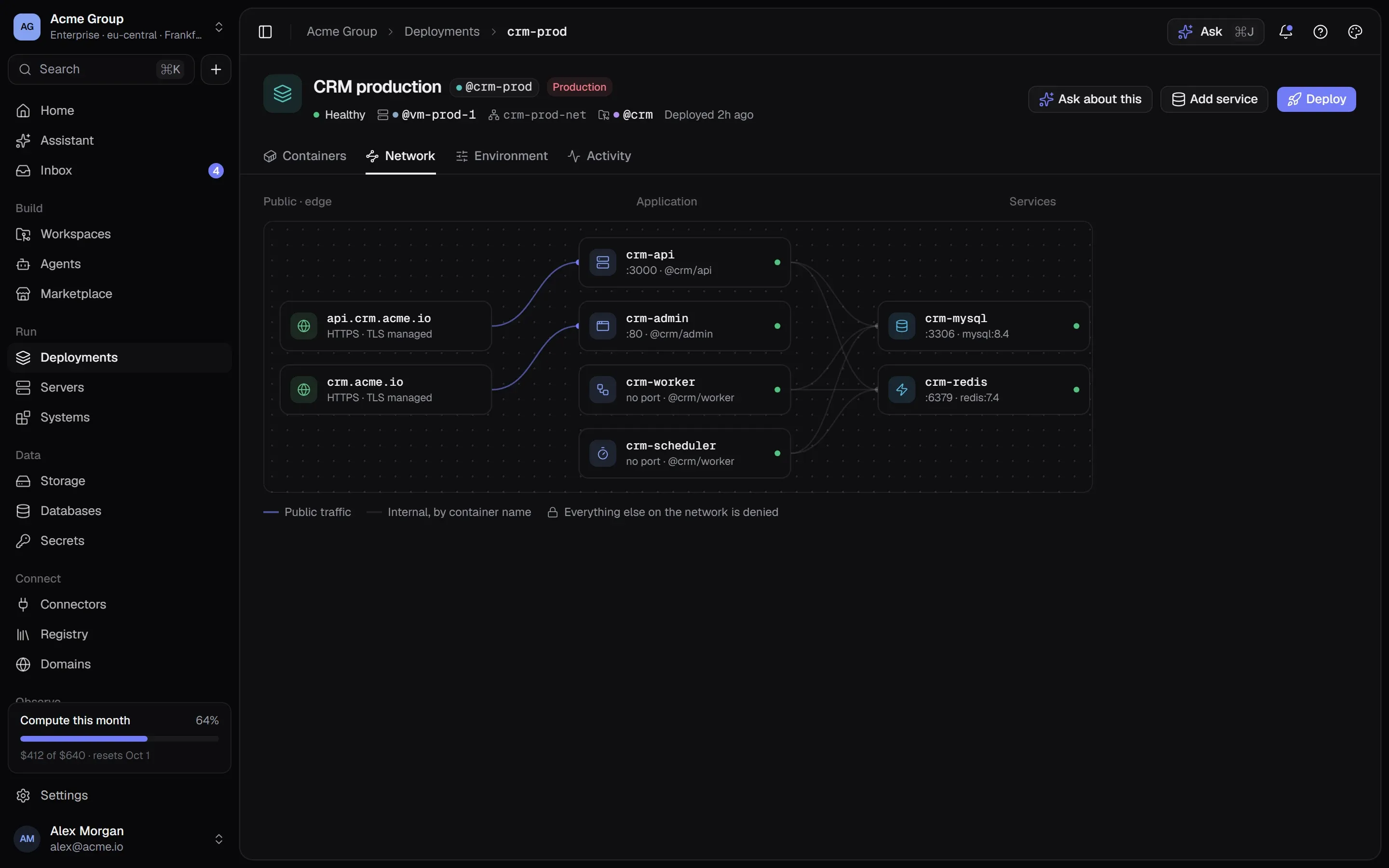
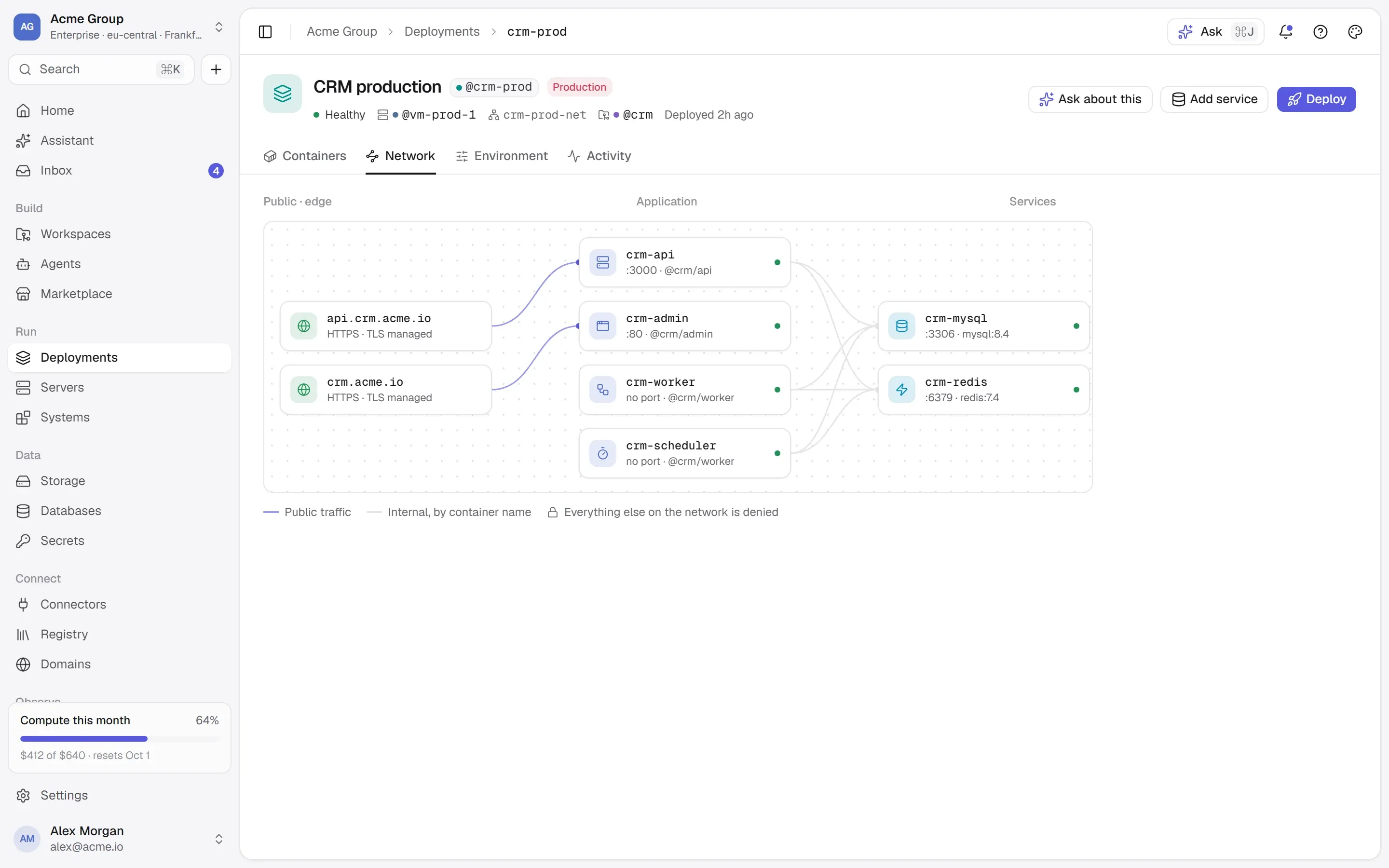
Public trafficInternal, by container nameEverything else on the network is denied
Deployments
/deployments
Stacks of containers on private networks, drawn the way they run. A deploy has to pass its health check before it takes over — if it doesn’t, the old one keeps serving.
Rolling or stop-first
Docker commands shown before they run
Live logs and metrics
14:00 · now running
8 vCPU · 16 GB
00–072 vCPU · 4 GB
07–198 vCPU · 16 GB
19–244 vCPU · 8 GB
Servers
/servers
Real servers in our locations. Grow CPU and memory whenever you like — or give a server a different size at different times of day.
Ubuntu, Debian, Rocky, Alma
Backups and snapshots
A terminal in the browser
All 19RelationalDocumentKey-valueSearchVectorTime-seriesAnalyticsGraphWide-column
PostgreSQL
MySQL
MariaDB
MongoDB
CouchDB
Redis
Valkey
Memcached
Elasticsearch
OpenSearch
Meilisearch
Typesense
pgvector
Qdrant
InfluxDB
TimescaleDB
ClickHouse
Neo4j
Cassandra
Databases
/databases
Nineteen engines, from Postgres to vectors. Passwords generated and kept as secrets; daily backups into your own bucket.
9 categories
Restore takes a safety copy first
STRIPE_SECRET_KEYv4
•••••••••••••• encrypted · rotated just now
crm-apiv4
crm-workerv3older value
Deploy the 1 on v3
Secrets
/secrets
Encrypted, versioned, given to a container only at deploy time. When a value moves on, you see who still runs the old one.
Never on a command line
crm-exportsprivate
crm-exports.storage.talkingsuites.com
leads-q3.csv2.1 MB
invoices-2026-09.zip48 MB
brand/logo.svg4 KB
Share link · expires in 24 h
Storage
/storage
S3-compatible buckets with a web address of their own, files you can browse and share — and downloads that cost nothing.
Everything every container prints, searchable across the organization — with secrets masked on the way out.
Usage by day
8c1e2f4feat: bulk contact importpushed to main
acme/crm main
api/Dockerfile
admin/Dockerfile
worker/Dockerfile
CLAUDE.md
.claude/skills/
@crm/apicrm-api-stg8c1e2f4
@crm/admincrm-admin-stg4f2a1c9
@crm/workercrm-worker-stg4f2a1c9
Workspaces
/workspaces
Install the GitHub App on the repositories you choose. Every Dockerfile becomes a project; a push can deploy itself, pinned to the commit.
Environments per workspace
The documents plane: CLAUDE.md and friends
Ready-made39Docker HubliveMCP serversregistry
n8nAutomation · app + PostgresInstall
GrafanaMonitoringInstall
WordPressContent · app + MariaDBInstall
postgres
postgresDocker Official ImageInstall
pgvector/pgvectorPostgres with vector searchInstall
README read: POSTGRES_PASSWORD is required
GitHubissues, pull requests, codeInstall
Filesystemread and write filesInstall
Fetchweb content for agentsInstall
Marketplace
/marketplace
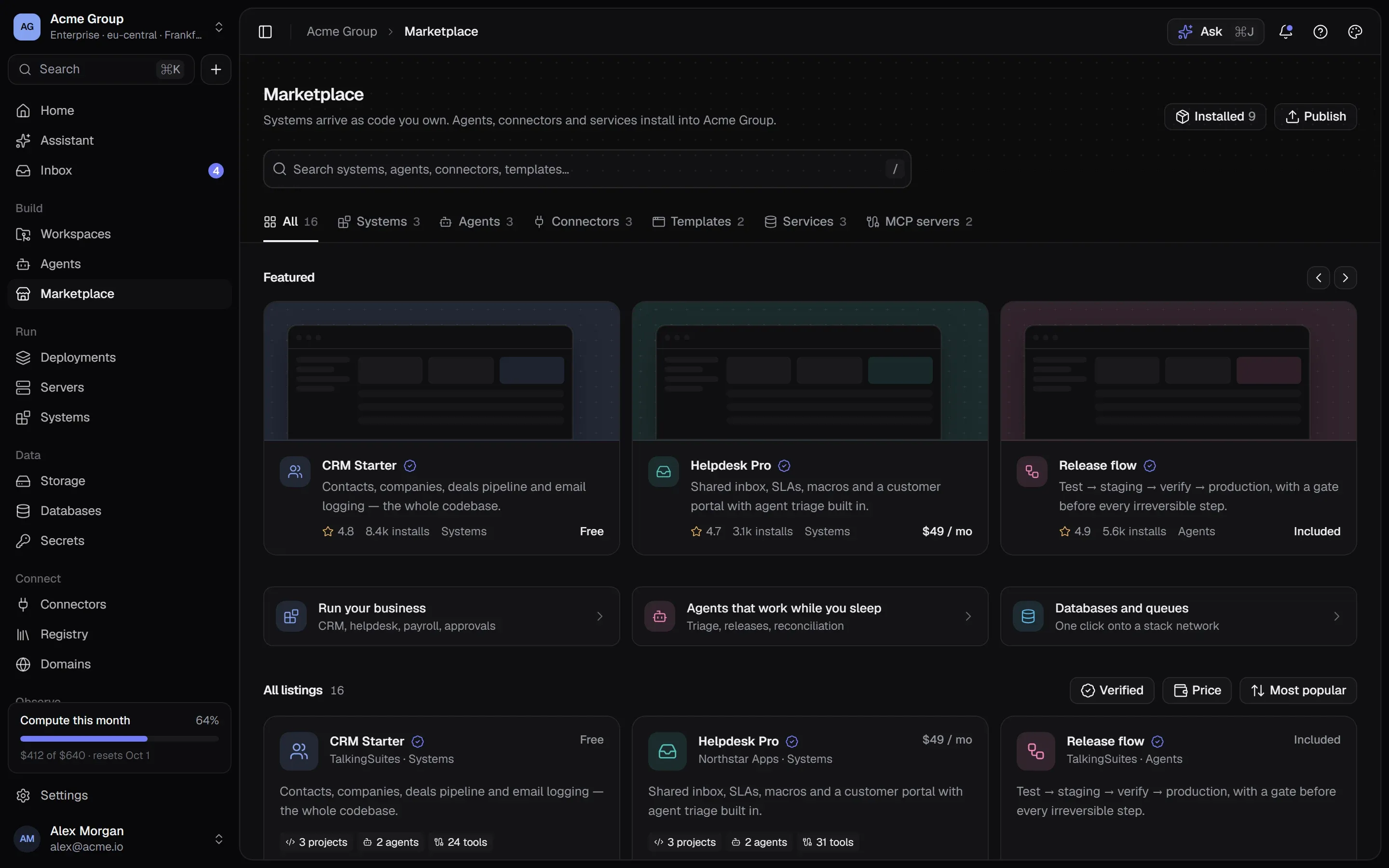
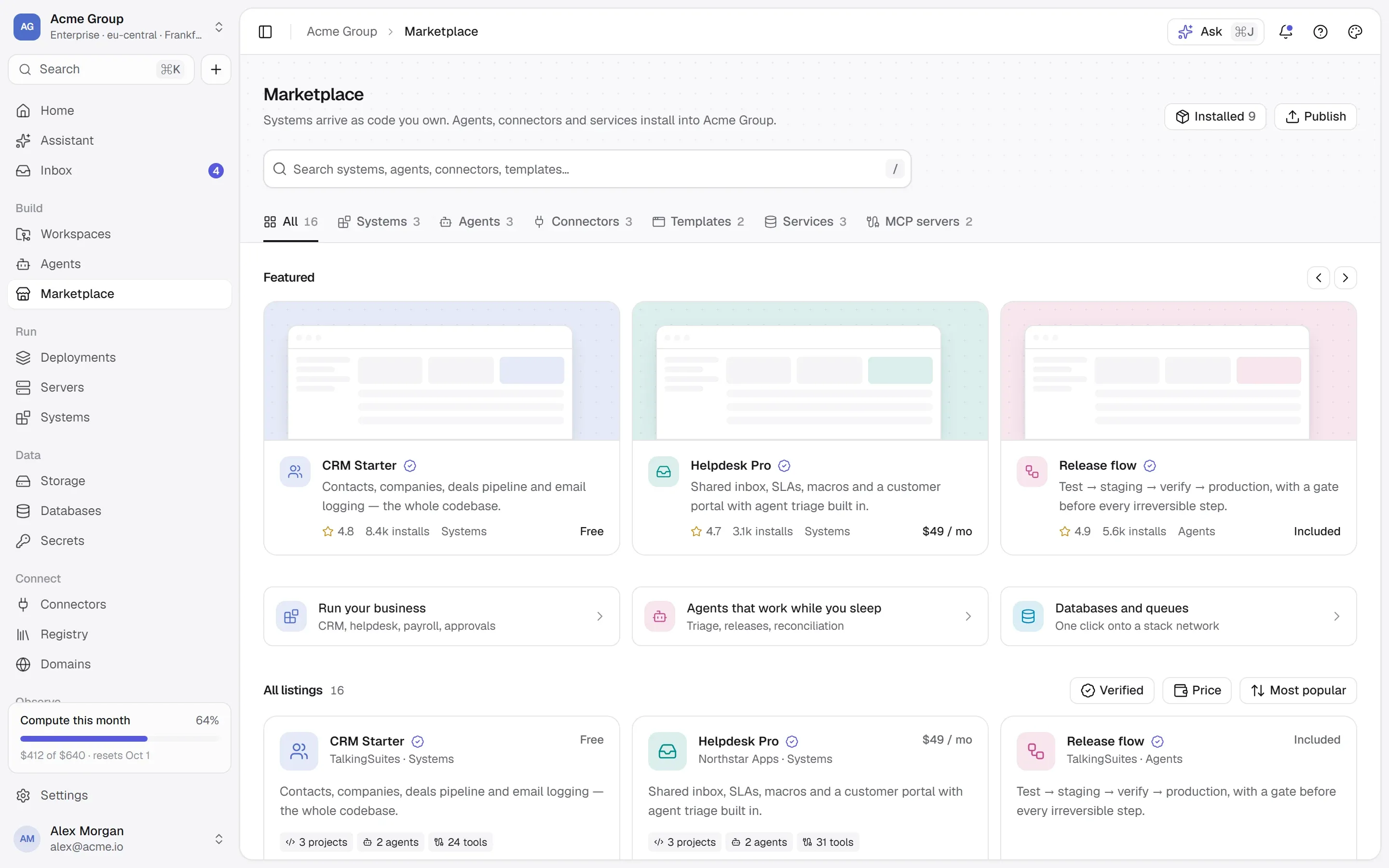
Start from something that works: ready-made apps and databases, any public Docker image with its README read for you, and the MCP registry.
42 ready-made listings
Installs as a stack you own
/systems
Every system you run can be talked to.
A system is a product’s own interface — usually an MCP server, in one of your containers or at an address. What it offers becomes the context an agent reads.
Discovered, not configuredPublishing a system asks its MCP server what it offers — tools, inputs and outputs, instructions, resources. Older servers speak the 2025 handshake; both work.
Try any tool from its pageA call that changes data asks first. One that destroys it asks for its name, typed back.
Every call on the recordA ledger row before the call, arguments redacted, the answer kept — and usage per system from the same rows.
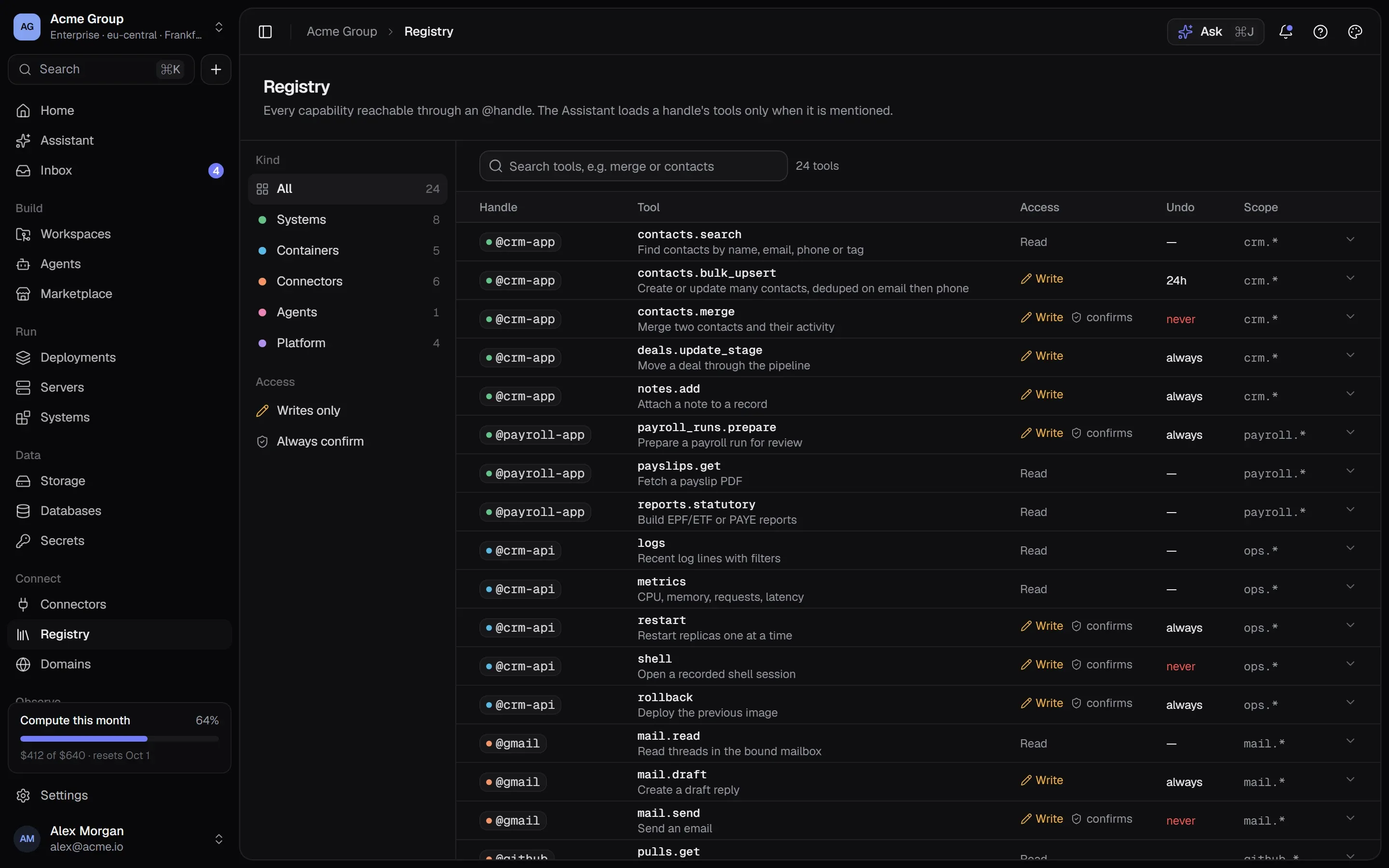
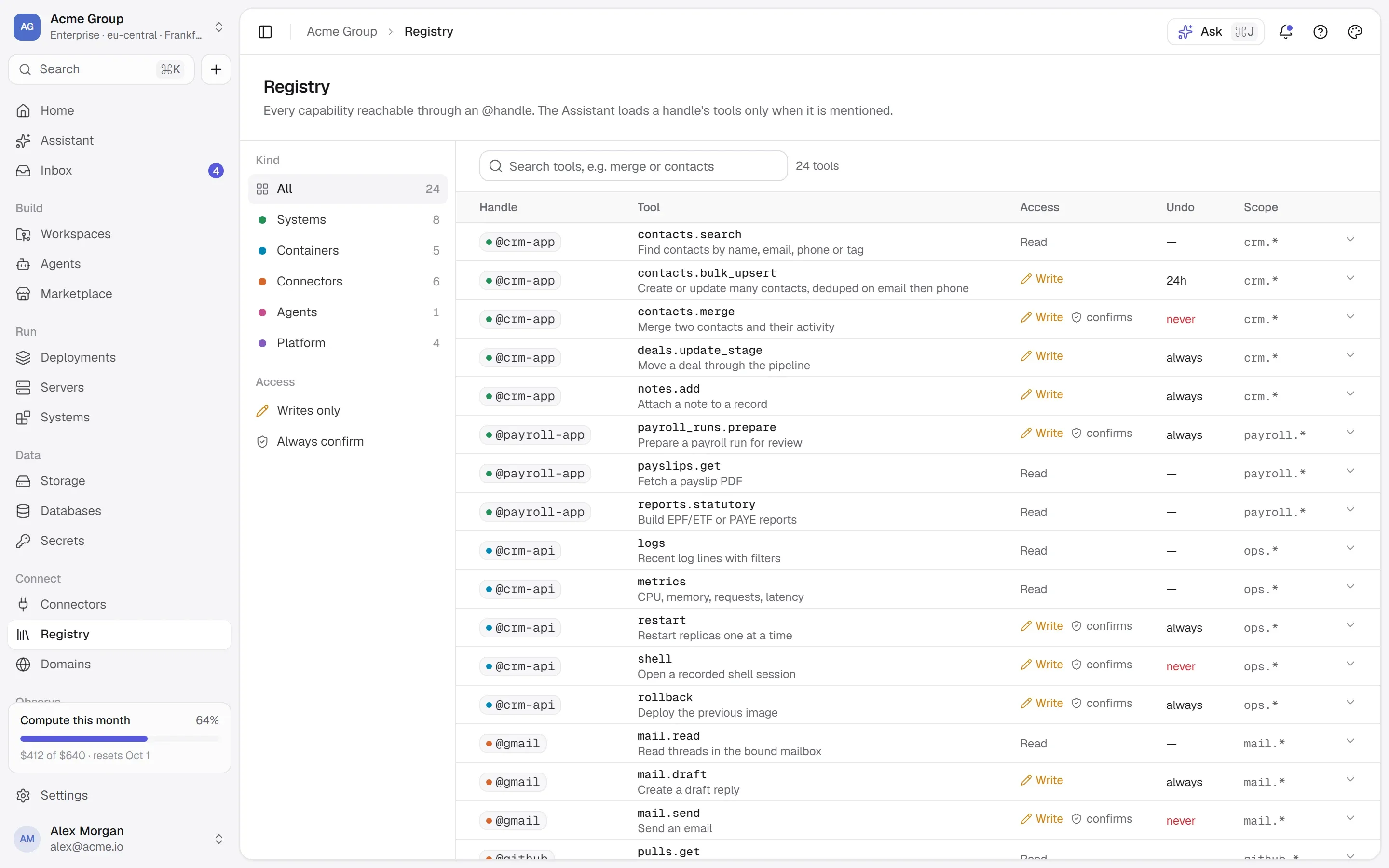
One registry for every toolEvery tool of every system in the organization, searchable, with thirty days of use.
Restarting a process and merging customer records are not the same risk — so they never sit behind the same permission.
@crm-apicontainerproductioncrm-apiOne running container — its logs, metrics, restart and shell. Not its data.crm-api:2026.09.25-8c1e2f4permission: stacks.managecontainerrestart · logs · shellbounces a processstacks.manage
@crm-agentsystemproductionAcme CRMThe CRM’s own interface — the MCP tools an agent can call. Its data, not its process.14 tools · 4 read, 9 write, 1 destructivepermission: systems.usesystemcontacts.mergechanges customer data for goodsystems.use
/tour
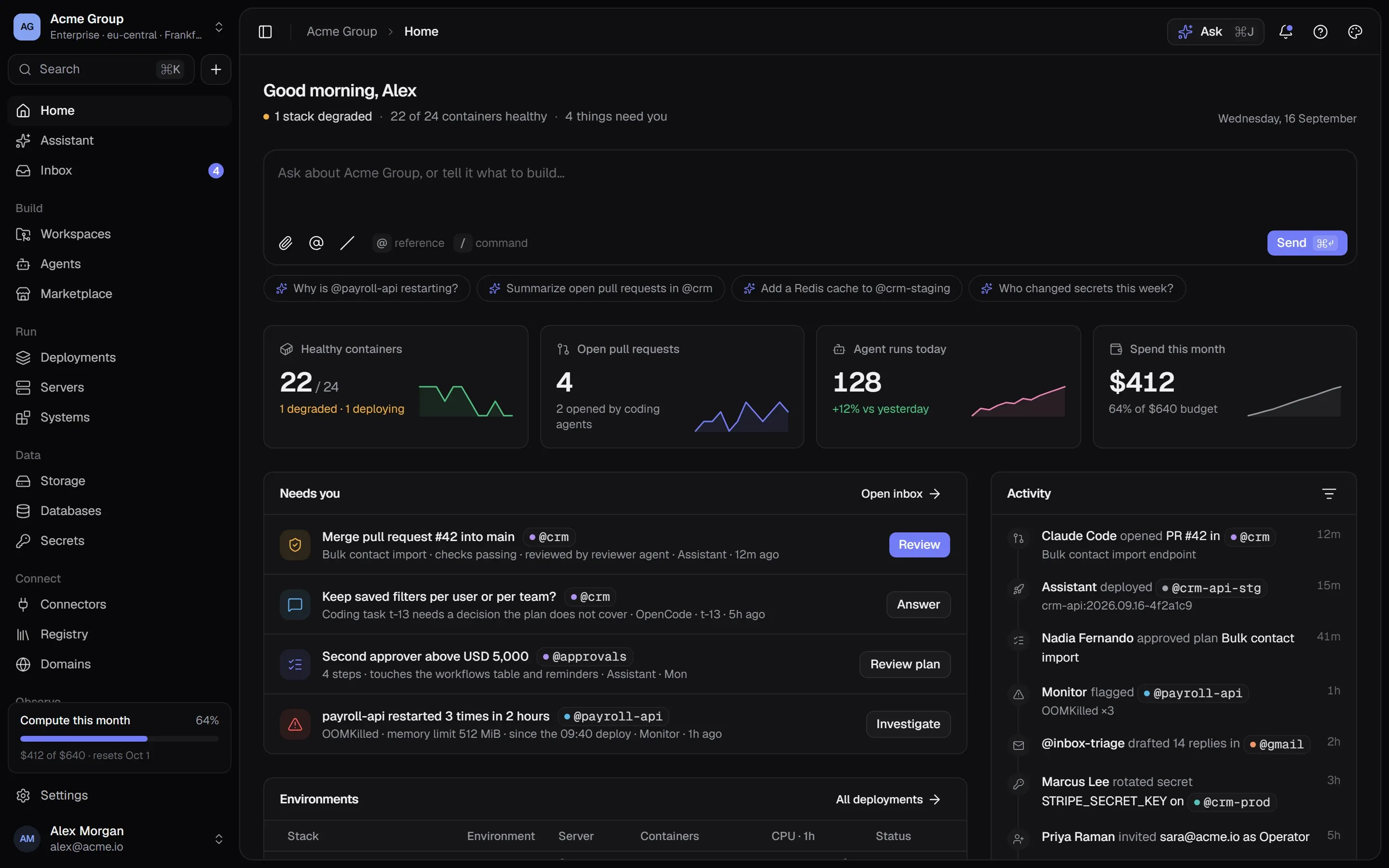
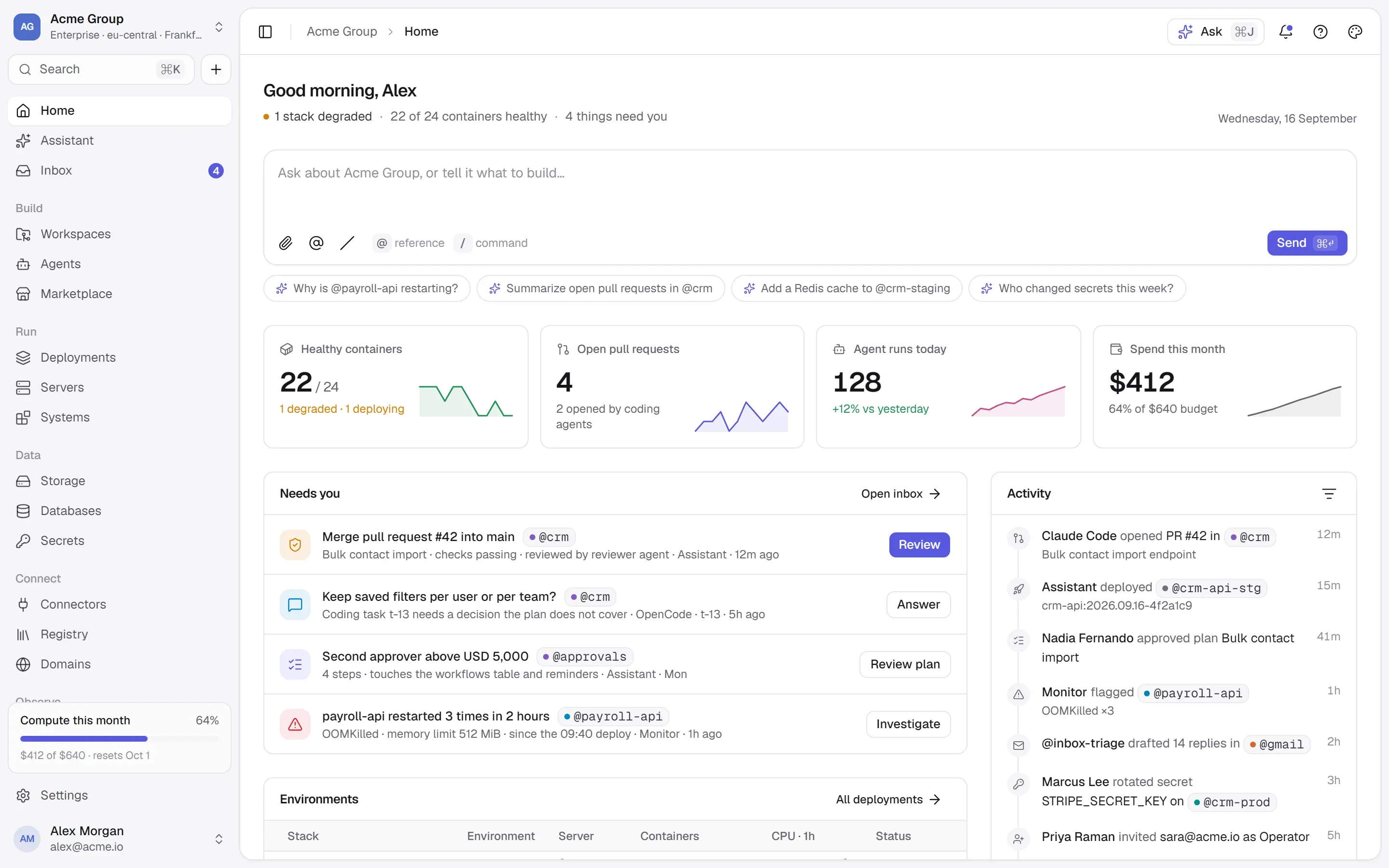
The real product, screen by screen.
Every screen here is the product’s own design — the one the app is built from.
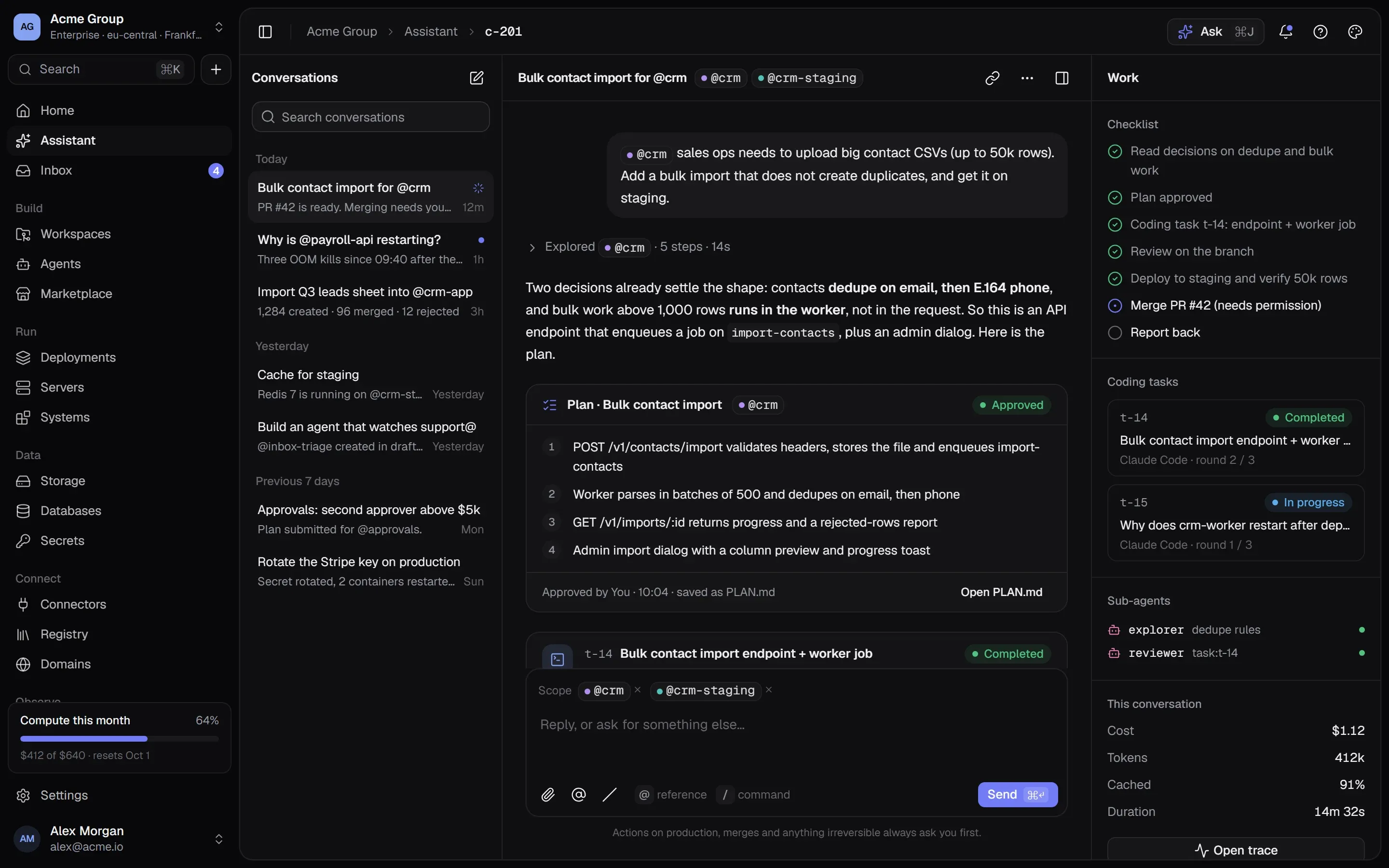
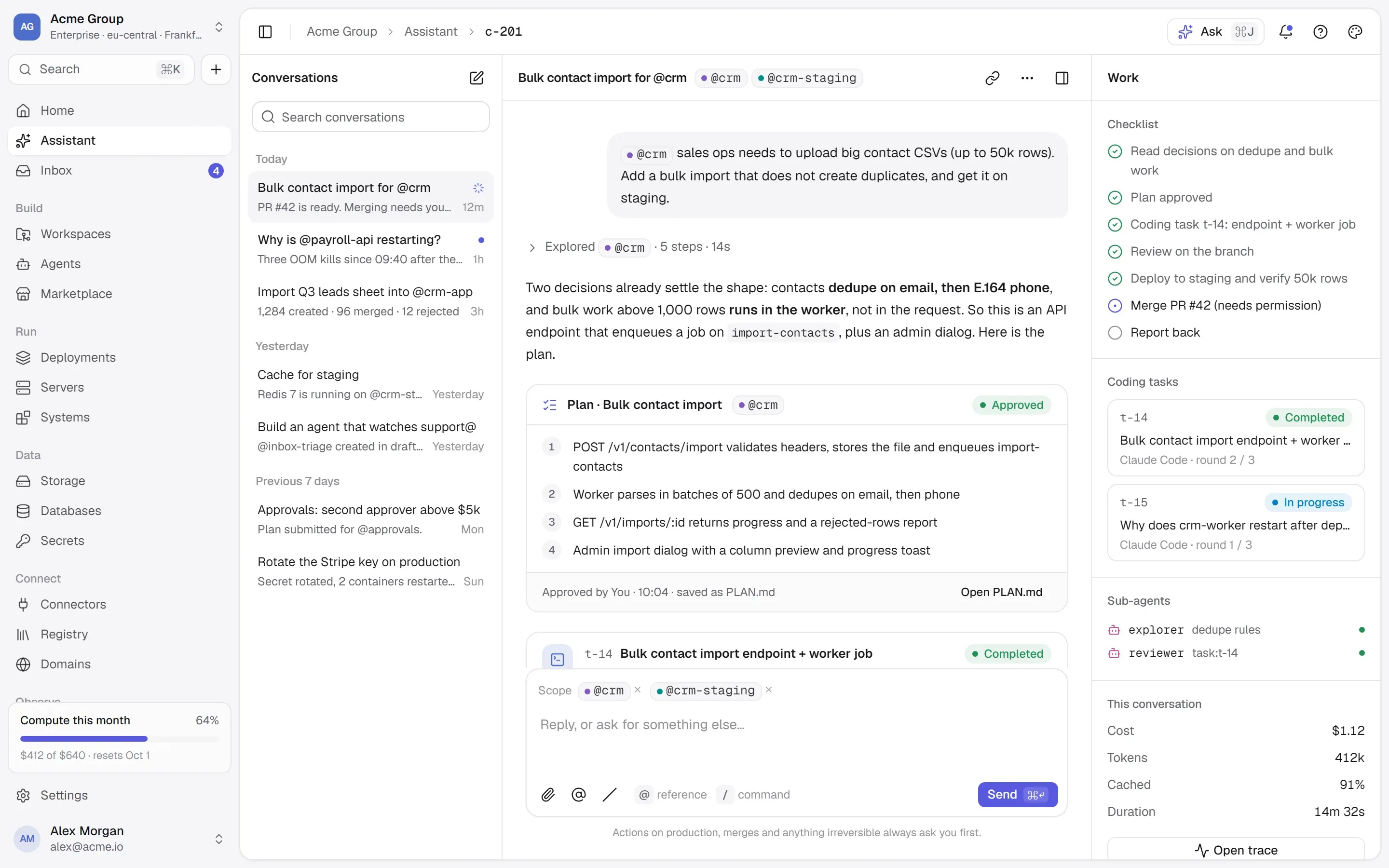
One conversation for everything
Ask about anything in your organization or tell it what to build. It keeps a checklist, runs coding tasks and sub-agents, and asks before anything irreversible.
Plans you approve before work starts
Coding tasks with rounds, cost and a branch
Cost, tokens and cache for every conversation
See what runs — and who can reach whom
Every stack is drawn as it runs: the public edge, the application, the services behind it, and the private network between them.
Containers reach each other by name
Everything else on the network is denied
Deploy, roll back and read logs from here
Start from something that works
Ready-made systems, databases and services, each with a page that says exactly what it will put on your server before you install it.
Every container, port and variable shown
Docker Hub and the MCP registry, searched live
Installs as a stack you own and can change
Every tool of every system, in one place
Each system’s MCP tools with what they take and return, whether they read, write or destroy, and how much they are used.
Reads, writes and destructive calls marked
Calls in the last 30 days
Loaded into context only when mentioned
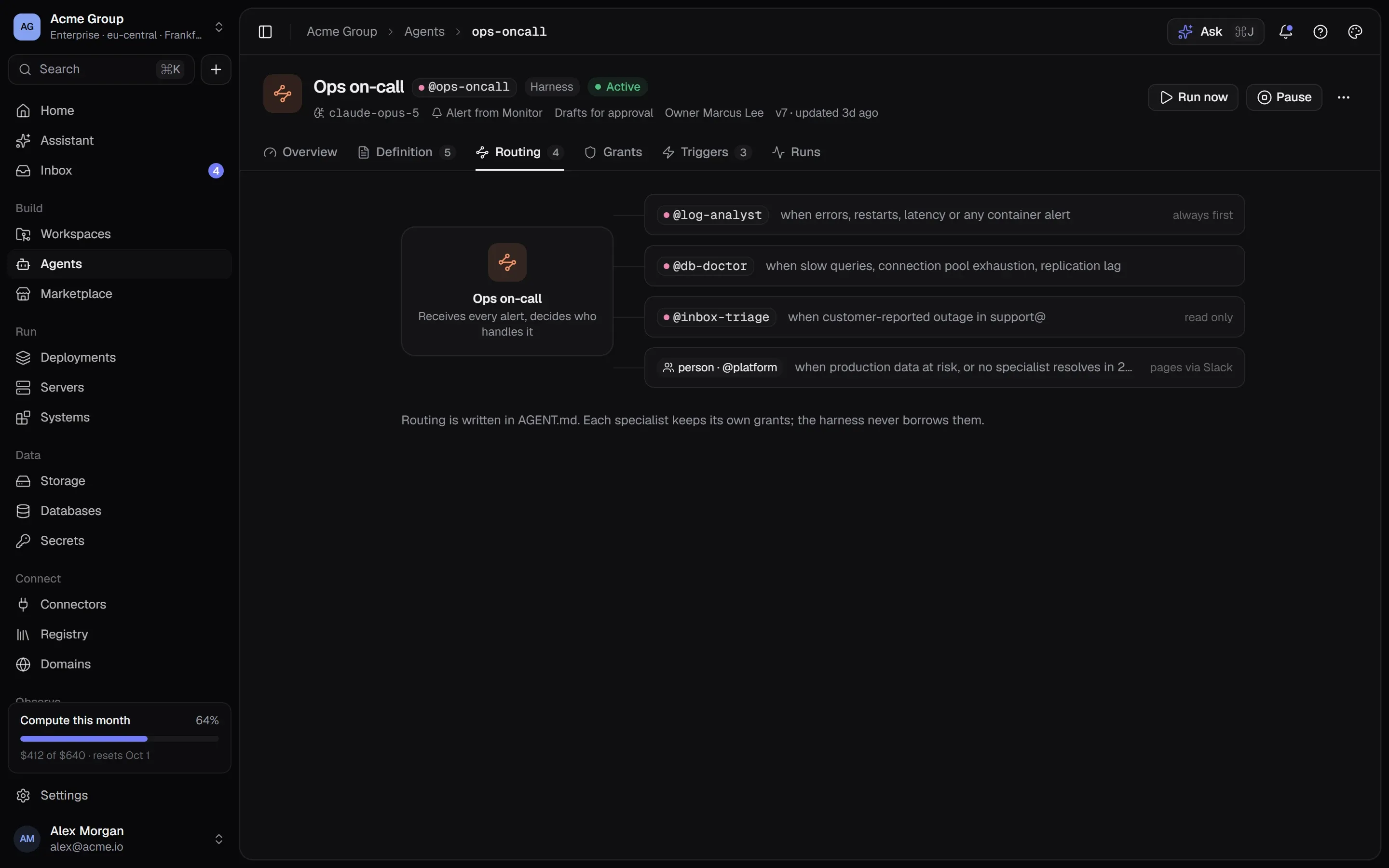
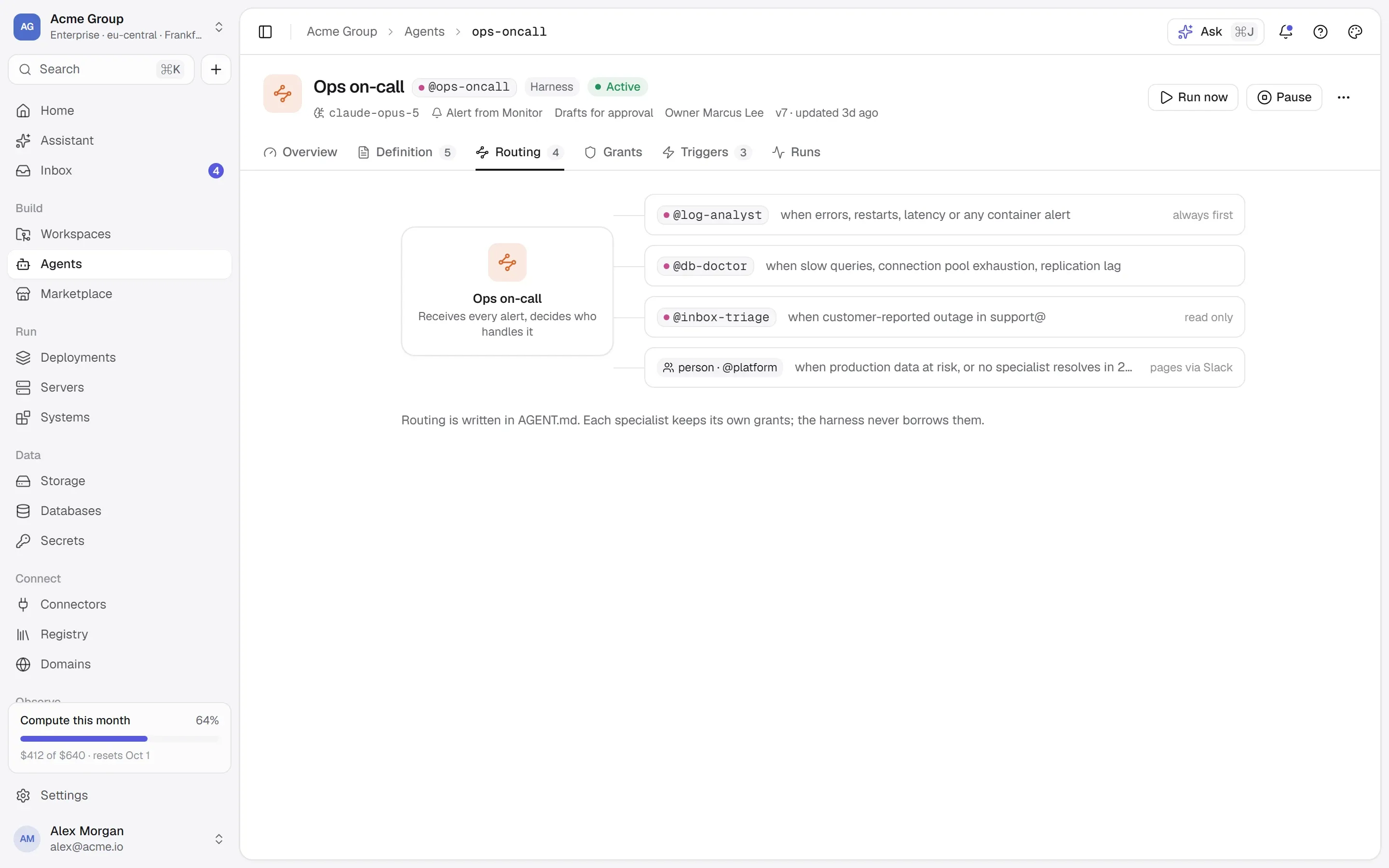
Agents that route to other agents
A harness receives every alert and decides who handles it — each specialist with its own grants, a person when production data is at risk.
Routing written in AGENT.md
The harness never borrows a specialist’s grants
People in the loop through @teams
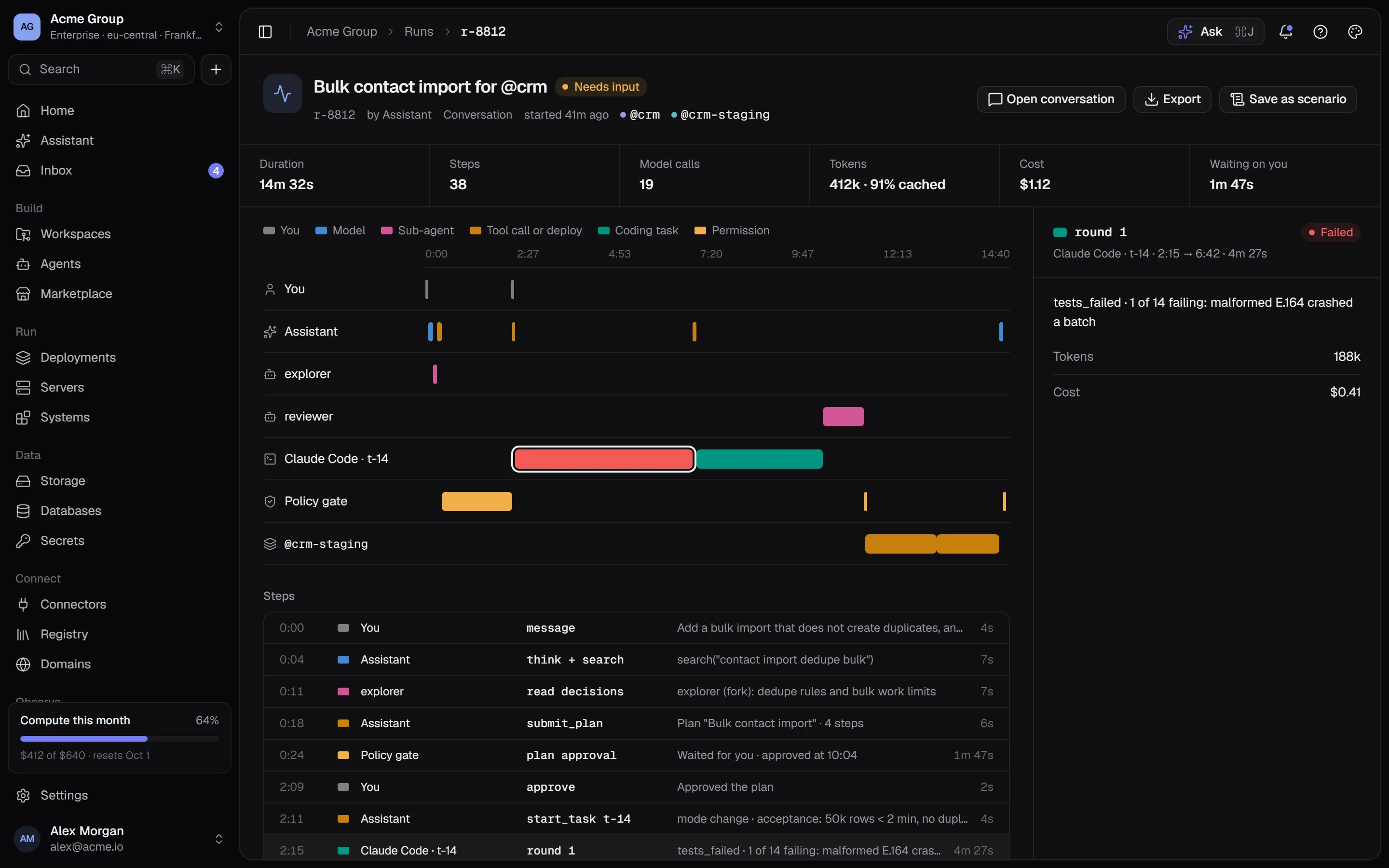
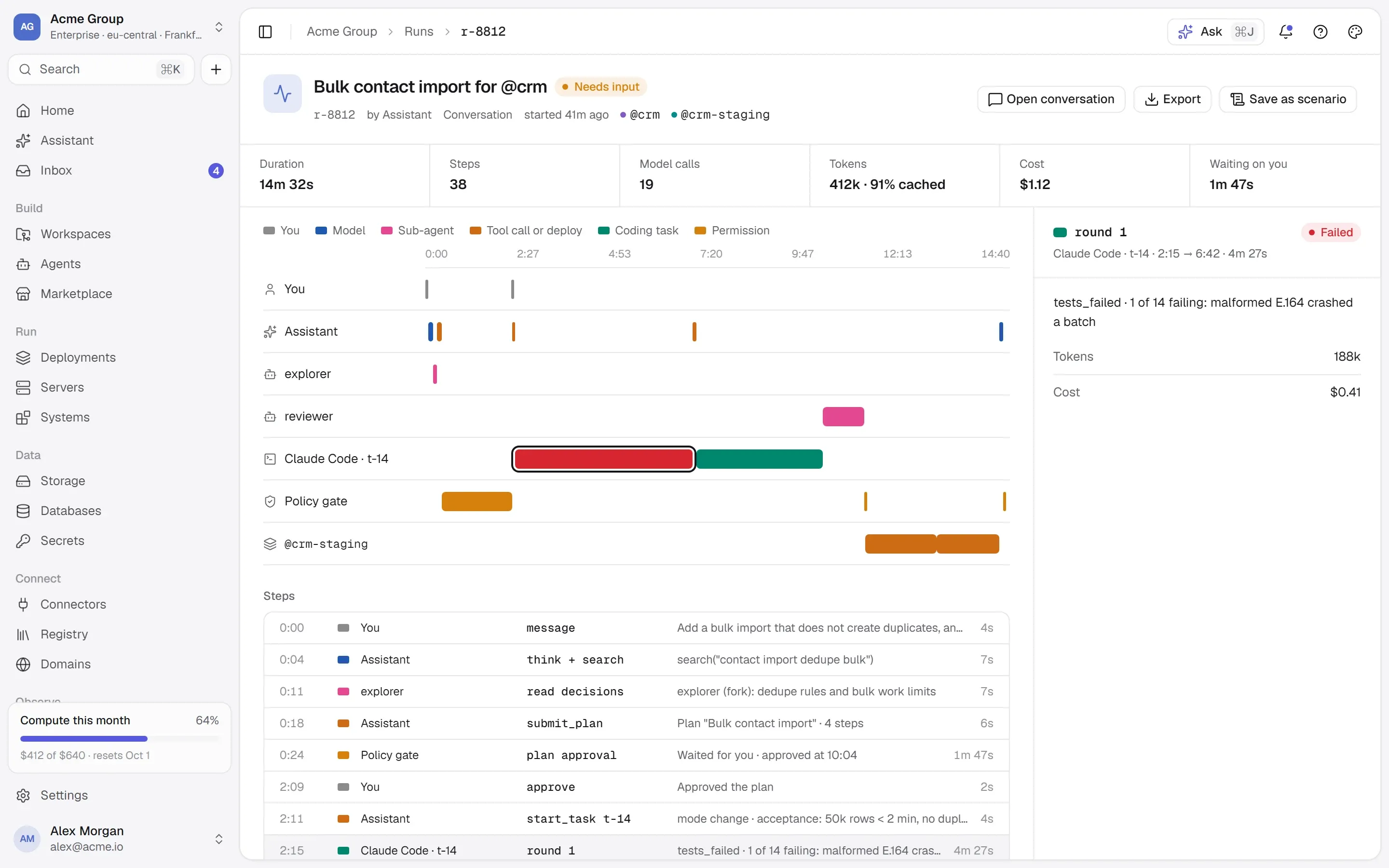
Every step, token and dollar
A run is a trace: who acted, which tool was called, what waited for a person and what it cost — down to the coding round that failed.
Lanes for you, the assistant, sub-agents and tools
Policy gates and time spent waiting on you
Tokens, cache and cost per step
@inbox-triageworkerclaude-haiku-4-5
AGENT.mdwhat it is for, how it decides
skills/classify.mdbilling · bug · sales · spam
skills/draft-reply.mdtone, sign-off, what never to promise
rules.mdnever send — draft and wait
Grants
@gmailread · draft
@crm-agentcontacts.search · contacts.create
Wakes on
a new email to support@ · drafts, then waits for a person
“Invoice INV-2291 charged twice”→billing→reply drafted · contact updated→waiting for a person
/agents
Agents are folders of markdown — with grants.
An agent is what it reads, what it may touch and what wakes it: AGENT.md, its skills and rules, a model, the tools and accounts it is granted, and its triggers. It versions like code, because it is files.
WorkerDoes one job — triage an inbox, reconcile payments, write the Monday digest.
HarnessRoutes work to other agents. Each specialist keeps its own grants; the harness never borrows them.
WorkflowA harness with an ordered plan — test, staging, verify, production — so workflows need no separate engine.
A triggered agent drafts and waits: anything outbound is a person’s decision. And it can call only what it was granted, tool by tool — here, two tools of @crm-agentsystemproductionAcme CRMThe CRM’s own interface — the MCP tools an agent can call. Its data, not its process.14 tools · 4 read, 9 write, 1 destructivepermission: systems.use.
/trust
Nothing irreversible without you.
Safety here is a set of mechanisms you can inspect, not a badge: what the platform will not do on its own, and what it writes down when it does.
An isolated cloud per organization
Servers, networks, databases, buckets and secrets belong to one organization. Nothing is shared with anyone else.
Destructive means typed back
A tool that changes data asks first; one that destroys it asks for its name typed back. Every call lands in a ledger.
Secrets never on a command line
Encrypted and versioned, handed to a container only at deploy time — over stdin, never in a command or a log line.
See it before it runs
Every create shows the exact Docker commands it will run, with secrets by name, before anything is made.
Deploys that can’t take you down
The new container must pass its health check before the old one goes. If it fails, the old one is still serving.
Sign-in you control
Passkeys, two-factor, single sign-on with OIDC or SAML 2.0, verified email domains — and you can require them.
Everything recorded
An audit log of every change, filterable and exportable as CSV — including what staff did on your behalf.
Nothing billed that you can’t see
Every server, volume and bucket is tagged to the record that owns it and reconciled every ten minutes.
Plans before work, questions climb a ladder
Coding starts from a plan you approved. An agent never interrupts you: it asks its lead, then the assistant, and only then you — one question, with a default.
/pricing
Pay for what runs. Nothing else.
No platform fee and no price per seat. Servers, storage and sandboxes are billed by what they use, and every price is shown before you create anything.
One place to build, deploy and operate software. Your organization gets its own isolated cloud — servers, containers, databases, storage and secrets — and every system you run there publishes an interface that agents can use. The goal is that you can do all of it by talking to it.
What is in the platform?
Servers, deployments, databases, object storage, secrets, workspaces connected to GitHub, the marketplace, systems that speak MCP, the tool registry, logs and usage — with domains, connectors, sandboxes, the assistant and the agents you build yourself.
How do I get started?
TalkingSuites is in early access. Request access, tell us what you would like to run first, and we write back from [email protected].
Where does my software run?
On servers created for your organization in our locations — you pick the region, the size and the operating system, and you can change the size later. Nothing you run shares a machine or a network with another organization.
Do I need to know Docker?
No. You choose what to run and the platform writes the configuration. If you do know Docker, every screen shows the exact commands a deploy will run before it runs them, and the names on the server match the names on the page.
What is a “system”, and what does MCP have to do with it?
A system is a product’s own interface — usually an MCP server, in one of your containers or at an address. Publishing one asks it what it offers: its tools, what each takes and returns, whether it only reads or changes things. That becomes the context an agent reads, and every call to it is checked and recorded.
Can I bring my own code?
Yes. Install the GitHub App on the repositories you choose; every Dockerfile in them becomes a project you can deploy. Each workspace keeps its environments — variables and secrets for production, staging and development — and a push can deploy itself, pinned to exactly the commit that was pushed.
How much does it cost?
The Free plan costs nothing; you pay for what you run. Servers and volumes are charged by the hour they exist — never more than their monthly price — and object storage by what it holds; downloads are free. There is no per-seat price. The assistant and agents run on prepaid AI credits, so they are never billed after the fact. Enterprise is a contract.
How do you keep it safe?
Each organization is isolated. Secrets are encrypted, versioned and only handed to a container at deploy time. Anything that changes data asks first and anything destructive asks for its name typed back. Sign-in supports passkeys, two-factor and single sign-on, and every change is in the audit log.
/start
Tell it what to build.
Request early access and tell us what you would run first — or talk to us about Enterprise.