Request early accessEarly access

/deployments

Deploys that can’t take you down. And a picture of what runs.

Stacks of containers on private networks, on servers that belong to your organization. A new container has to pass its health check before the old one goes, and you see the exact commands before anything runs.

  • Health-checked before it takes over
  • Roll back to any earlier deploy
  • Every command shown first
Deploy #148 of @crm-apiLive
crm-api…:2026.09.24-3b7d0a1removed
crm-api…:2026.09.25-8c1e2f4serving
  1. Pull crm-api:2026.09.25-8c1e2f414 s
  2. Start crm-api.next beside the running one2 s
  3. Health check — GET /healthpassed in 6 s
  4. crm-api.next takes the name · the old one goesno gap

Strategy: start beside, then switch — nothing here keeps data or holds a port.

/how-deploys-work

Containers you can reason about, from the first deploy to the fiftieth.

A stack is a group of containers on one server, on a private network — with custom domains and HTTPS in front of the services that need them.

01

Stacks and networks, drawn the way they run.

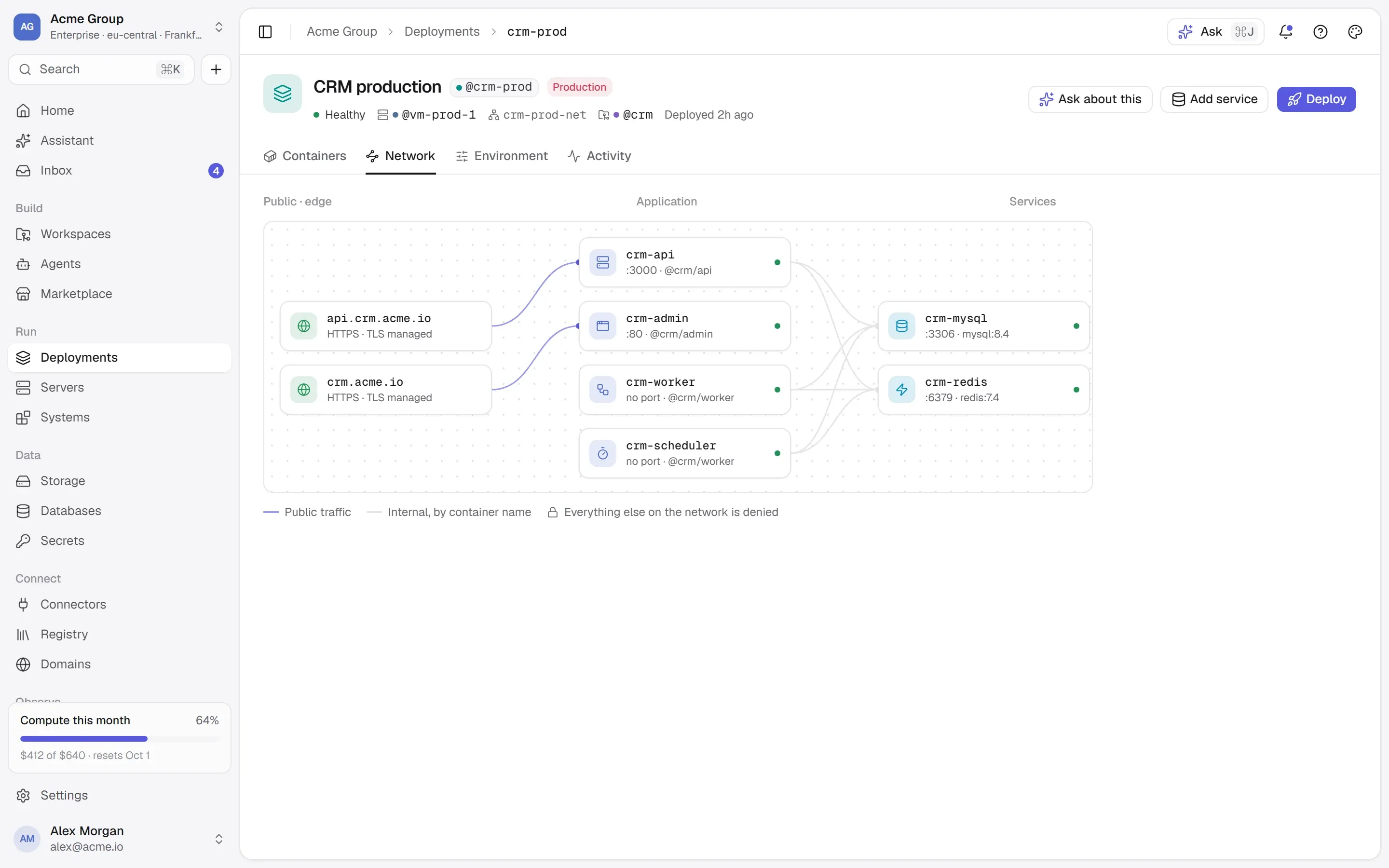
Every server has a default stack and a default network, so a container never needs one made for it. Every create screen asks where it goes: the server, the stack — the default, one you have, or a new one — and the Docker network. A container can be on several networks at once, so two stacks can share one database without being merged.

  • One name on both sides: what the page calls a container is what docker ps calls it.
  • A database shared into another stack is drawn in both places, with the network that connects them.
  • Every network on every server, with who is on it — and new ones made from any picker.
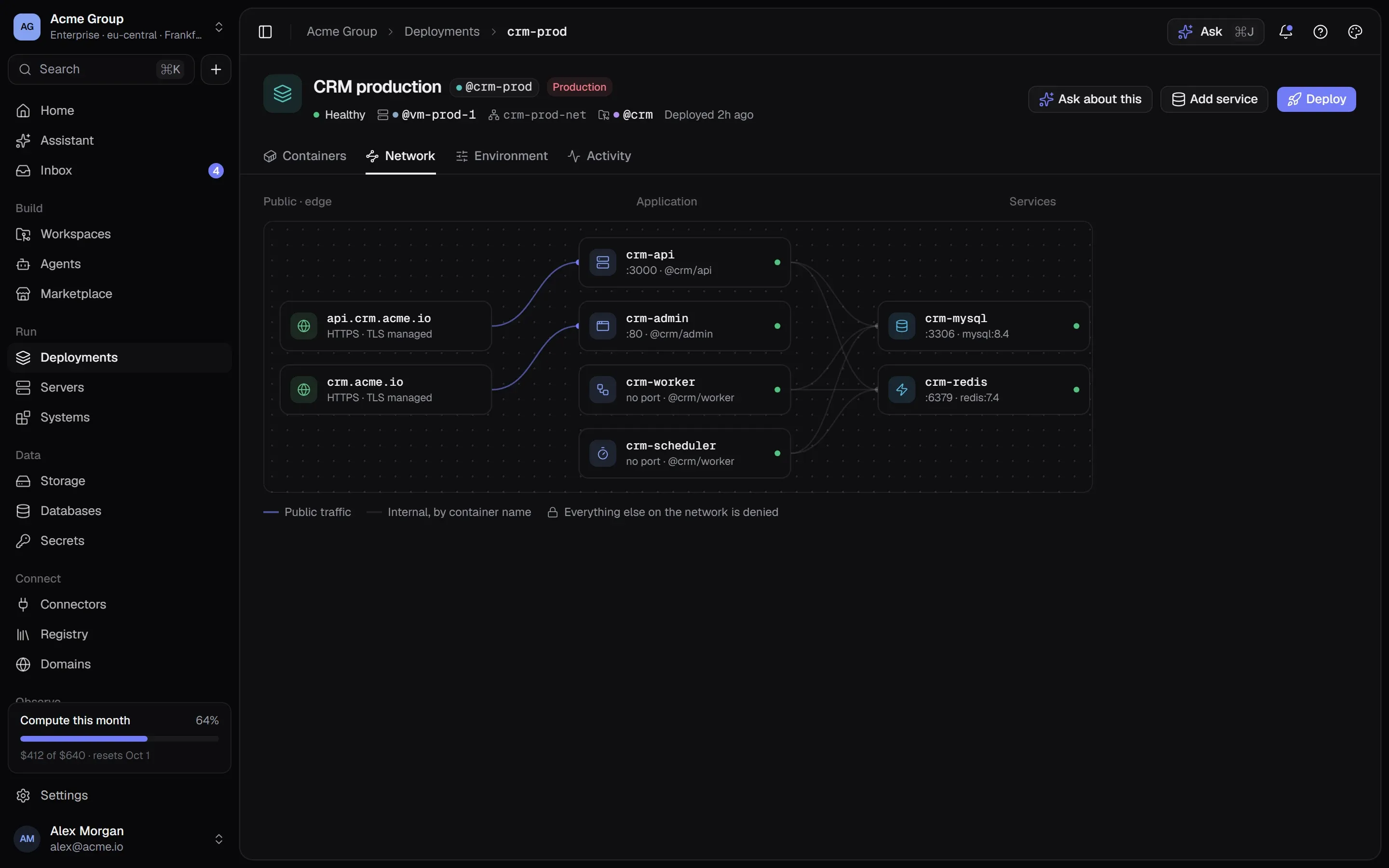
A stack’s network map: two public addresses, four application containers and the MySQL and Redis services behind them on a private network.A stack’s network map: two public addresses, four application containers and the MySQL and Redis services behind them on a private network.

02

Every change is a deploy, and a deploy has a way back.

A container is never edited in place: a change is a new container, and the old one goes only when the new one works. Anything that keeps data or holds a port is stopped first and started again if its replacement does not come up — two copies of a database never share a data folder. Anything else starts beside the running one and takes over with no gap.

  • The health check decides. If it fails, the deploy says why and nothing changed for your users.
  • Roll back to any earlier deploy — redeployed with today’s secrets, so rolling back code never brings back a rotated password.
  • Each deploy says which container it made, so every one can be found on the server.
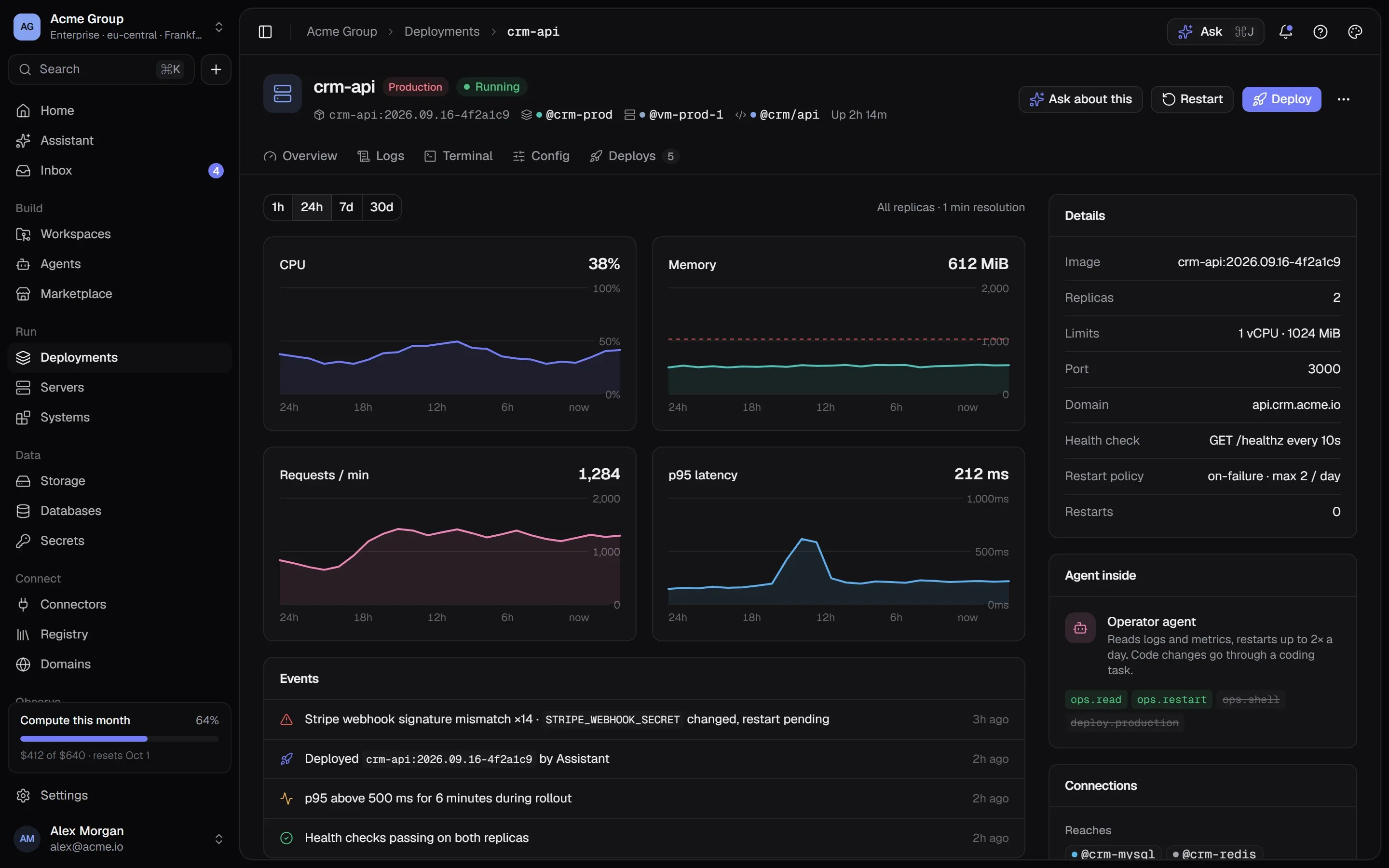
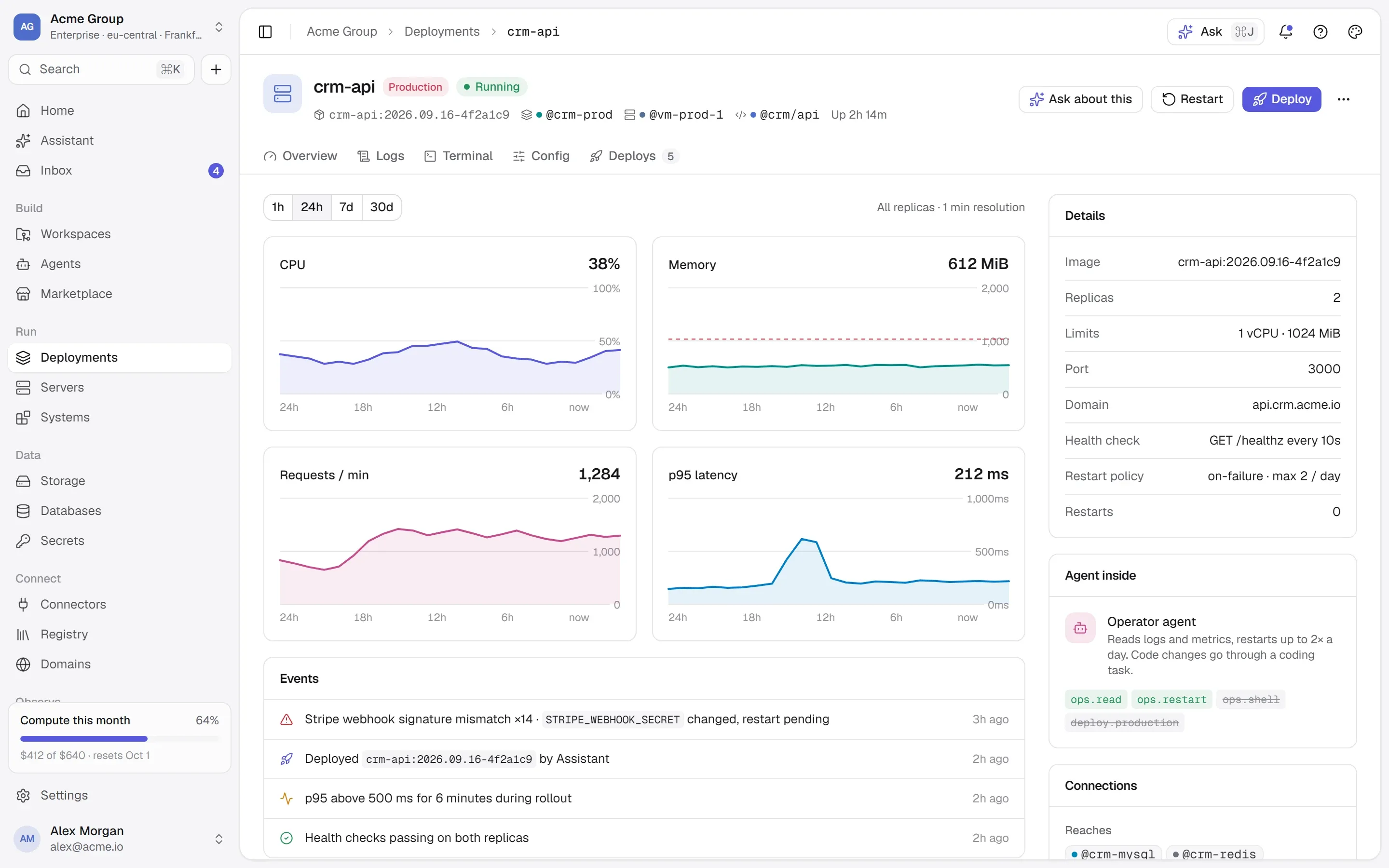
A container page: status, image, ports, resource use and recent deploys.A container page: status, image, ports, resource use and recent deploys.

03

See what will run before it runs.

Every create, install, deploy, redeploy and rollback opens the same review: the steps and the exact Docker commands, who can reach each port, every variable by where its value comes from, and any warning. Secrets appear by name, never by value. Nothing runs until someone ticks “I have checked what will run” — and the server checks again that the plan has not changed since.

  • Forms check quietly as you type, so a taken port or name is said before you ask for the review.
  • Warnings in words: a database open to the internet, a password kept as plain text, an app nobody can reach.
  • If a colleague took a port in the meantime, the approval is refused and the new plan is shown to check again.
Review what will run on @vm-prod-1

Replaced by stopping first — it keeps data. Port 3306 stays inside ts-default.

  1. 1Make the network ts-default — if it is not on the server yetdocker network create ts-default
  2. 2Download mariadb:11.8docker pull mariadb:11.8
  3. 3Create and start itdocker run -d --name mariadb --network ts-default \ --restart unless-stopped \ -e 'MARIADB_PASSWORD=<generated, kept as the secret DB_PASSWORD>' \ -v 'ts-mariadb-data:/var/lib/mysql' mariadb:11.8
  4. 4Wait until its health check passes
I have checked what will run on vm-prod-1Create

04

Ports that say who reaches them.

A port is internal unless you say otherwise. Local binds it to the server itself; private to your organization’s servers in the same location, with an allowlist in Docker’s own firewall chain because that network is shared; public to anyone. Leave the number empty and the next free one is used. A port that is taken is refused, naming what holds it and what is free.

  • Two numbers, both named: the port inside the container and the port on the server.
  • Ports 80 and 443 are kept for the domain router; services use 1024 and up.
  • Every server picker shows the ports already taken on that server.
@crm-mysqlport 3306 — who can reach it?
  • Internalnot publishedcontainers on its networks, by name
  • Local127.0.0.1:7098the server itself — or you, through an SSH tunnel
  • Privatethe private addressyour organization’s servers in the same location
  • Publicthe public addressanyone

vm-prod-2 — yours

another customer’s server — dropped by the firewall

05

The whole server, read back every two minutes.

The platform checks what is really running on every server it can reach. A container someone started by hand — with Docker or Compose — is shown read-only, with its log, and its name and ports are never taken. A container that dies at 3 a.m. becomes a notification for the people who can fix it; a server that stops answering is said to be unreachable rather than fine.

  • Containers you did not deploy from here: image, state, ports, networks — and only the names of their variables.
  • A crash, a failed deploy, a server out of reach: told to the people with permission to act.
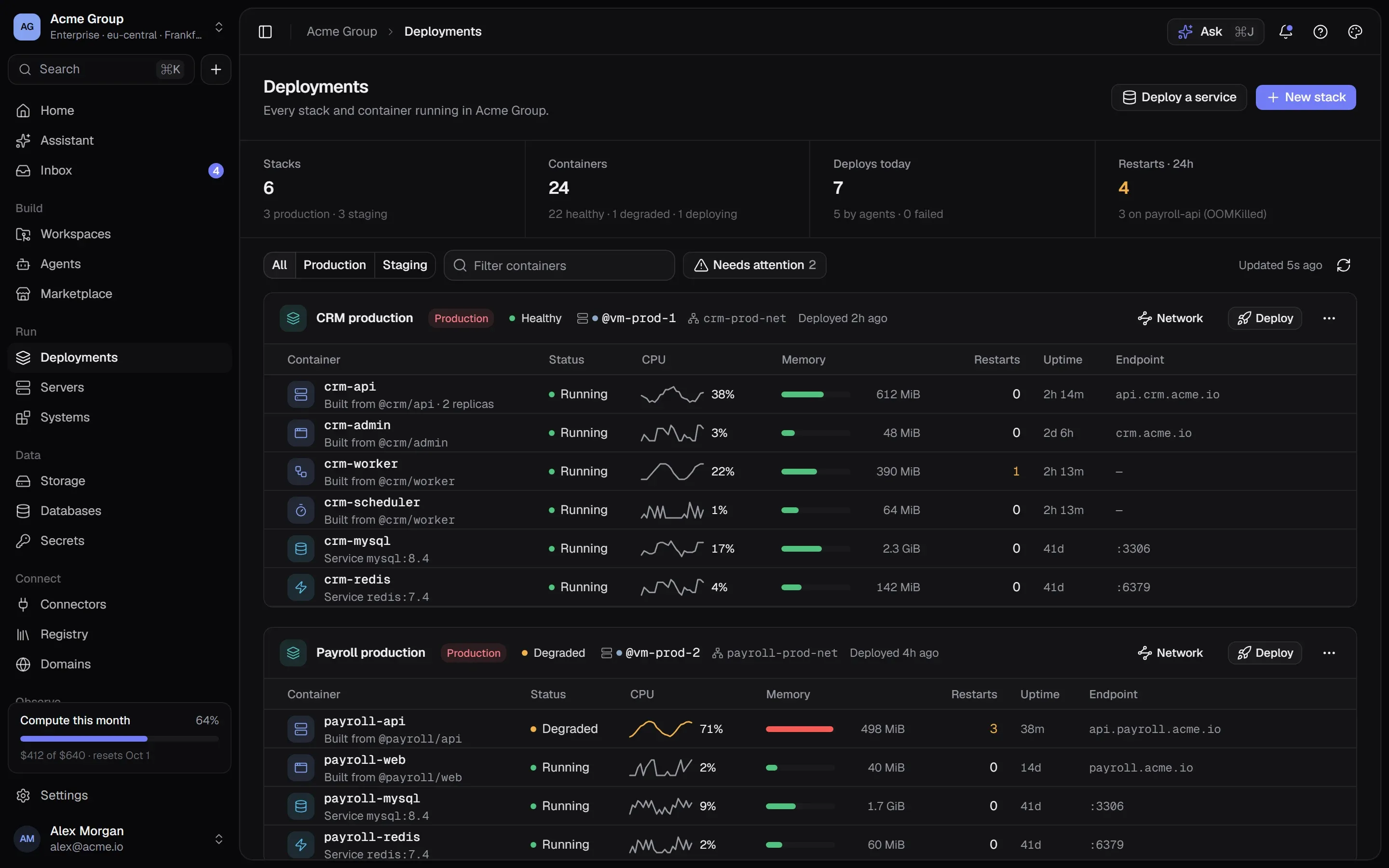
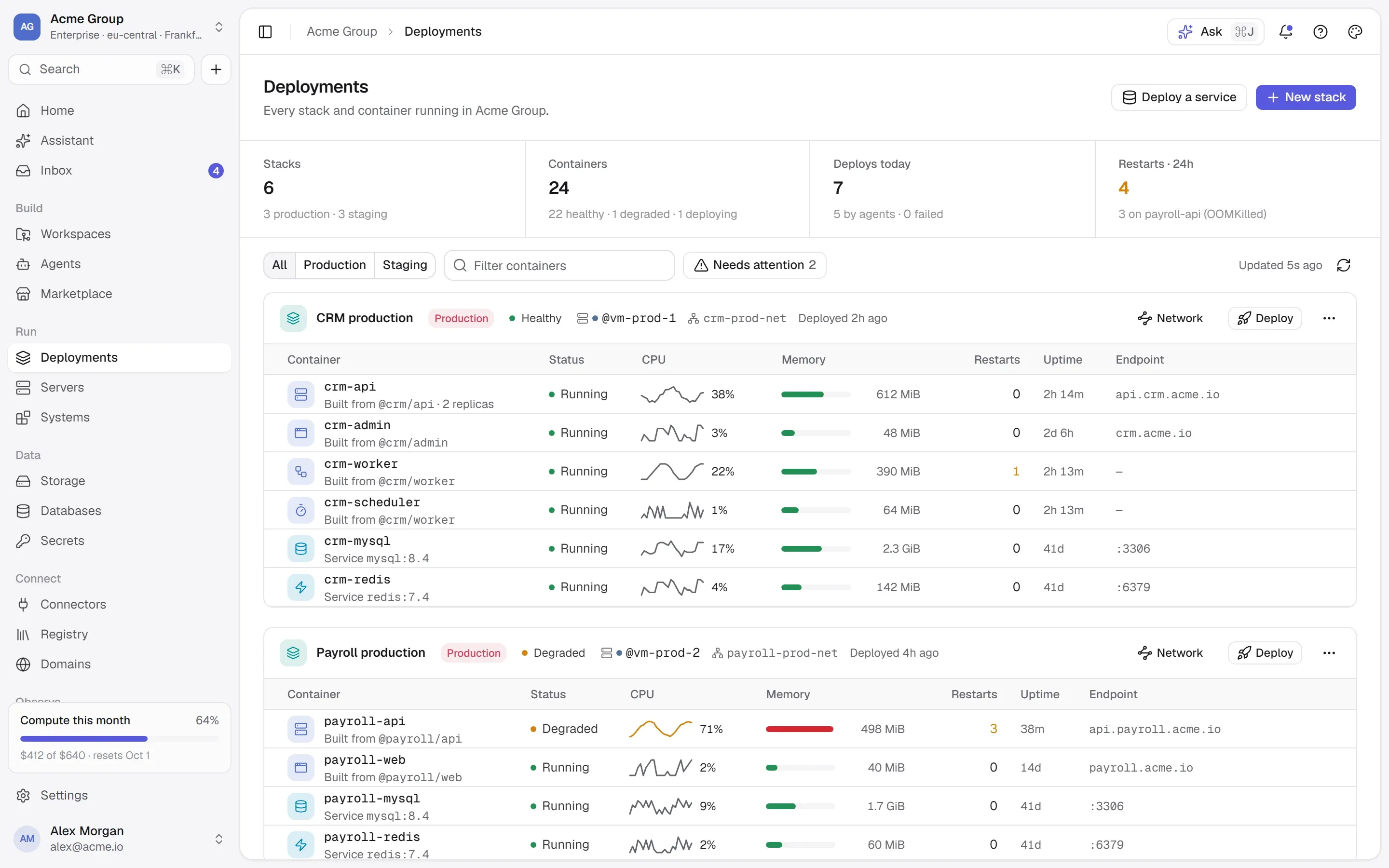
  • Deployments shows every server, its stacks and containers, and each machine’s memory beside what claims it.
Deployments: every stack with its containers, their status, CPU and memory.Deployments: every stack with its containers, their status, CPU and memory.

06

Logs, stats, restart — without SSH.

Each container has its live log, statistics, restart, stop and start, and its deploy history. What every container prints is also collected every minute and kept for three days, searchable across the whole organization, with secrets masked on the way out. A memory limit is optional: start with none, watch what it really uses, set one when you know.

  • Search every container’s log at once, with a volume chart and filters by level and container.
  • Unlimited containers are counted as such, so a memory bar never says “room to spare” on a full machine.
  • When you do want a shell, the server’s own terminal opens in the browser, recorded.
public · :8080anyone can reach itprivate · :8081your servers onlycrm-api:3000 · rolling deploysdeploying 8c1e2f4…health check passedcrm-admin:80 · @crm/admincrm-workerno port · jobscrm-schedulerno port · croncrm-mysql:3306 · mysql 8.4crm-redis:6379 · redis 7.4public · :8080anyone can reach itprivate · :8081your servers onlycrm-api:3000 · rolling deploysdeploying 8c1e2f4…health check passedcrm-admin:80 · @crm/admincrm-mysql:3306 · mysql 8.4crm-redis:6379 · redis 7.4

Public trafficInternal, by container nameEverything else on the network is denied

Works with

  • Docker
  • GitHub
  • Git
  • PostgreSQL
  • MySQL
  • Redis
  • Nginx
  • Caddy
Every integration →

/faq

Deployments, answered plainly.

Something else? Write to [email protected] or use the contact page — a person answers.

What can I deploy?

Anything that runs as a container: a public image by name from Docker Hub or any public registry, a database from the catalogue, something ready-made from the Marketplace, or your own code — a folder with a Dockerfile, built on your own server from exactly the commit you chose.

What happens when a deploy fails?

The new container is removed and the old one keeps serving. For something that keeps data and had to be stopped first, the old container is started again under its name. Either way the deploy says why it failed, and the container is still running with a note rather than being called failed while it serves.

Can two apps share one database?

Yes. A container can join another stack’s network without a redeploy, and apps on that network reach it by name. A stack that borrowed a database leaves it alone when the stack is removed. Both stacks draw it, with the network that connects them.

Can a stack span several servers?

No — on purpose. Containers reach each other by name because they share a Docker network, and a Docker network lives on one machine. Crossing servers is possible and explicit: a database publishes a private port and another server’s containers connect to its address. Scaling one service across servers is not built.

Do I get a domain with HTTPS?

Yes: a router on ports 80 and 443 of each server, domains verified the way single sign-on domains are, certificates renewed on their own. You can also publish a port — or give the server Nginx or Caddy with Certbot when you create it and point it at your container.

Do I have to know Docker?

No. The forms ask plain questions and the platform writes the configuration. If you do know Docker, the review shows the exact commands a deploy will run, and names on the server match the names on the page.

/start

Ship it. Keep the way back.

Request early access and deploy your first container — you only pay for the server it runs on.

Quick links

Request early accessthe way in
Platform overvieweverything in one isolated cloud
Marketplaceapps, databases, Docker Hub, MCP
Pricingplans, usage, AI credits
Securityisolation, secrets, approvals, audit
Changelogwhat shipped, newest first
Talk to ussales, help, security, privacy

Appearance

Dark mode
Light mode
System mode
Moonlight palettesilver-white · moon blue · lavender grey · the default
Signal paletteindigo · the classic
Ember paletteorange · amber · crimson
Aurum palettegold · bronze · champagne
Clay paletteterracotta · rust · sand
Mocha palettecaramel · mocha · cream
Rosewood palettedusty rose · wine · blush
Sage palettesage · eucalyptus · oat
Tide palettesea teal · deep sea · seafoam
Slate palettesteel blue · slate · mist
Dusk palettelilac · mauve · slate blue
Indigo accent
Violet accent
Blue accent
Teal accent
Emerald accent
Amber accent
Orange accent
Rose accent
Graphite accent
Cool surface
Neutral surface
Warm surface
Midnight surface
↑↓ move↵ open⌘K or / anywhere on the site