Request early accessEarly access

/systems

Every system you run can be talked to.

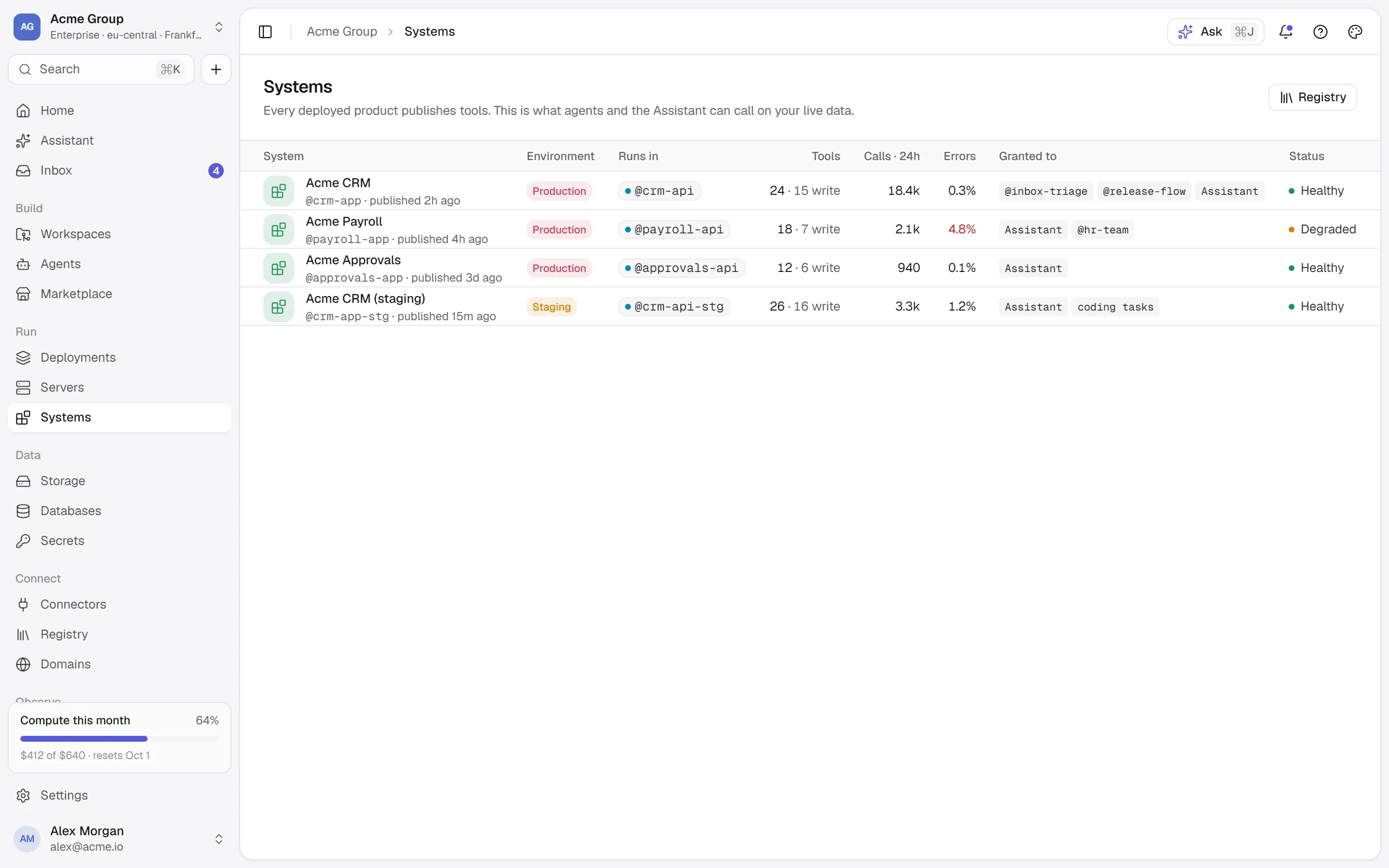
A system is a product’s own interface — usually an MCP server, in one of your containers or at an address. Publishing one asks it what it offers, keeps that as the context an agent reads, and puts every call on the record.

  • MCP 2026-07-28 and the 2025 handshake
  • OpenAPI too
  • Every call in a ledger
crm-apicontainer · :3000/mcp · private networkMCP 2026-07-28
@crm-agentproduction14 tools

Acme CRM — contacts, companies, deals and files.

  • contacts.search(query, limit)reads
  • contacts.bulk_upsert(rows[], dedupe_on)writes
  • files.attach(entity, id, file)writes
  • deals.update(id, stage)writes
  • contacts.merge(keep, merge)destructive
  • + 9 more
Type contacts.merge to confirmcontacts.merge
INSTRUCTIONS.mdTOOLS.mdrecorded · tcl_7fa2

/how-systems-work

An interface is more than an endpoint.

People try tools from the console; agents call the same tools — through the same gate and the same ledger.

01

Two handles, two blast radii.

A running product has two handles on purpose: the container — logs, restart, a shell — and the system, its own API. Restarting a process for ten seconds and merging two customer records forever are different risks, so they are separate pages behind separate permissions: stacks.manage for the container, systems.manage to change what the product exposes, systems.use to call it.

  • @crm-api restart bounces a process.
  • @crm-agent contacts.merge changes customer data and cannot be undone.
  • Collapsing them would put both behind one grant. They never are.
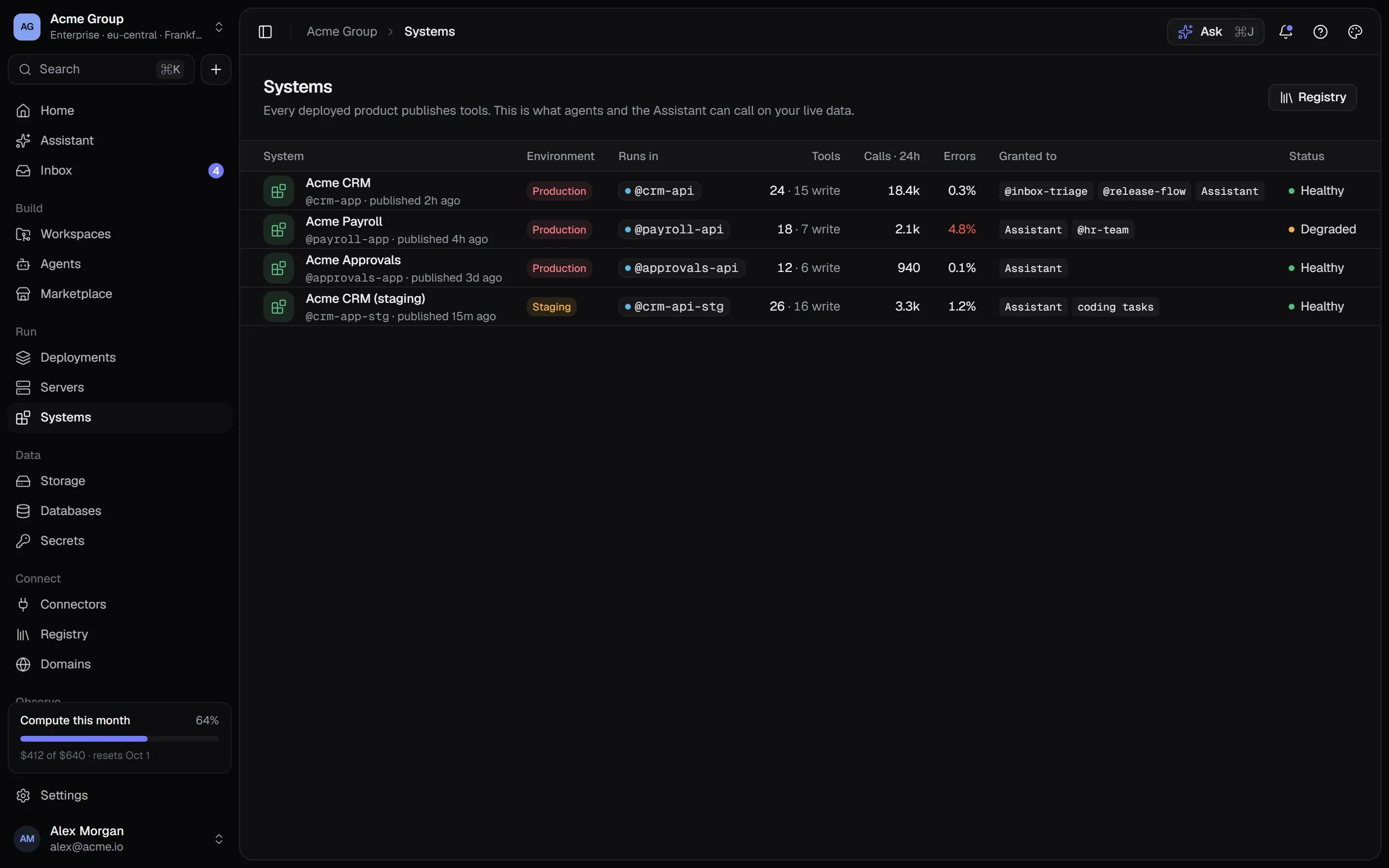
Systems: each product’s MCP interface with its tools and who may use them.Systems: each product’s MCP interface with its tools and who may use them.

02

Discovered, not configured.

Publishing a system reads what it offers: every tool with its full description, what it takes and gives back, its annotations; the server’s own instructions; its resources and prompts. It speaks MCP revision 2026-07-28 and falls back to the 2025 handshake for servers that need it — or reads an OpenAPI document, each operation a tool. That becomes INSTRUCTIONS.md and TOOLS.md, beside your own documents.

  • A container is spoken to from its own server — its port never has to be published.
  • At an address, only public https is accepted, checked when saved and on every connection.
  • Signing in to your product uses a secret, sent for each exchange and never shown or stored in a call.
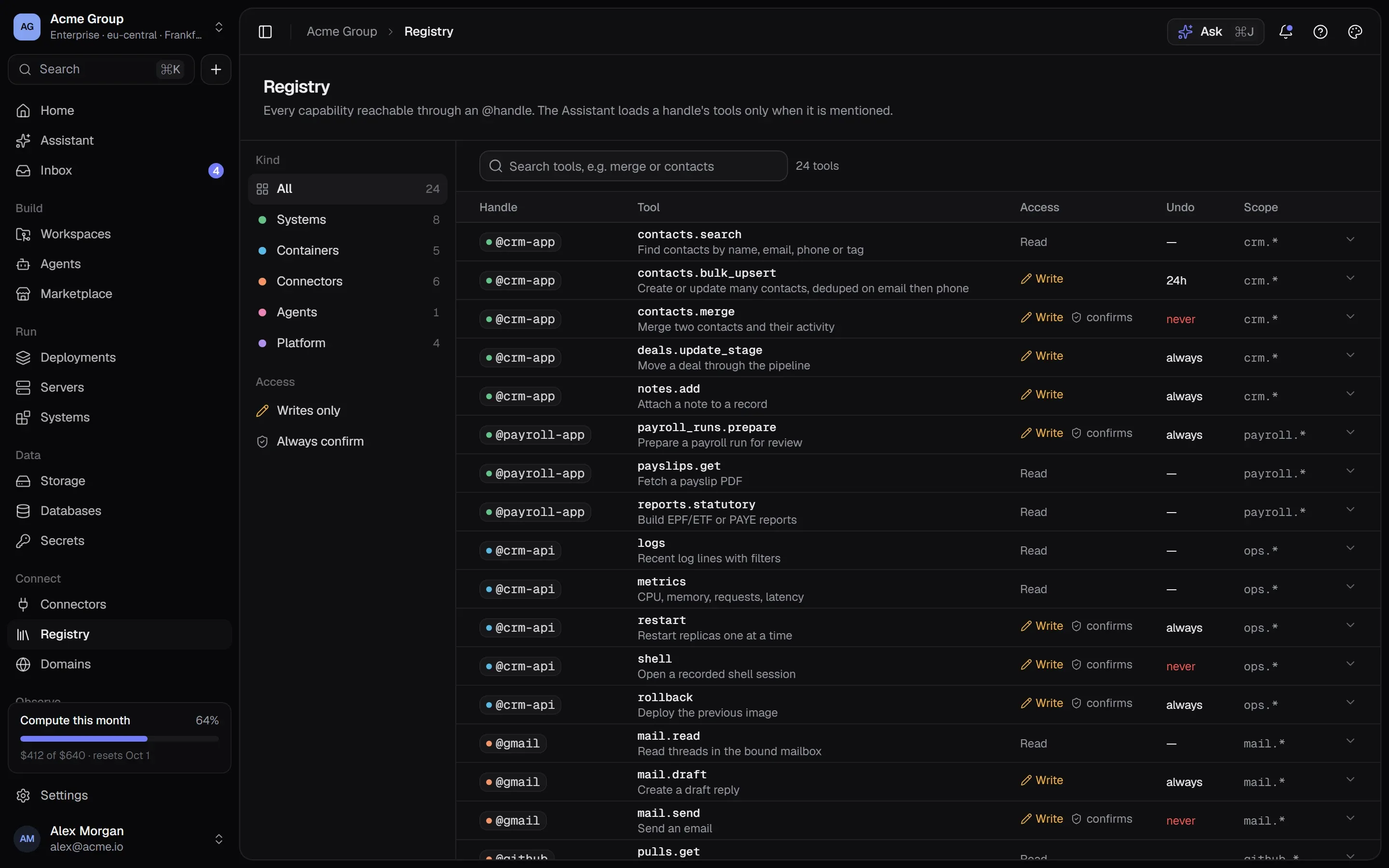
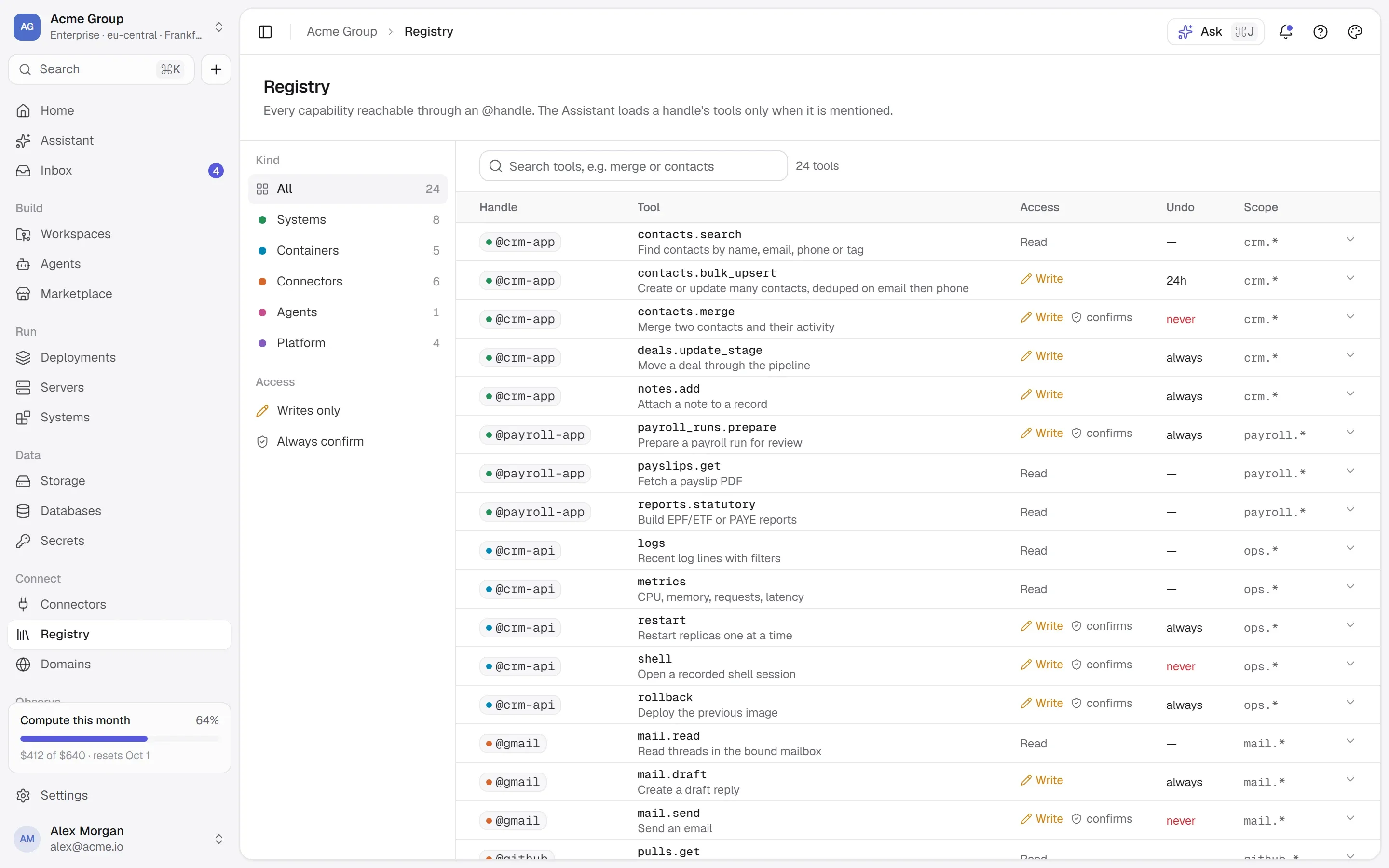
The Registry: every tool of every system, marked as reading, writing or destructive, with recent calls.The Registry: every tool of every system, marked as reading, writing or destructive, with recent calls.

03

Try any tool — it asks the right question.

Each tool has a class: read, write, destructive or external. A read runs. A write or a tool that reaches outside asks you to confirm. One that cannot be undone asks for its name, typed back. Anything that does not declare itself read-only is treated as a write — the safe way to be wrong — and “reversible” is never guessed: you set it.

  • Try it builds a form from the tool’s own input schema.
  • A tool the server calls destructive can’t be made undoable by hand.
  • Reading the system again keeps your corrections for the tools it still offers.
@crm-agent · callsrecorded before each call
  1. 09:43:30companies.getread{ id: "co_12" }200 · 9 ms
  2. 09:43:02contacts.mergedestructive{ keep: "c_88", merge: ["c_91"] }name typed back · 240 ms
  3. 09:42:40webhooks.createexternal{ url: "https://…", secret: [redacted] }confirmed · 96 ms
  4. 09:42:05deals.updatewrite{ id: "d_1042", stage: "won" }confirmed · 180 ms
  5. 09:41:30contacts.bulk_upsertwrite{ rows: [1,380], dedupe_on: "email" }confirmed · 2.1 s
  6. 09:41:12contacts.searchread{ q: "acme", limit: 20 }200 · 14 ms

04

Every call, written before it runs.

A row is written before anything is sent: who called, which tool, the arguments with anything that looks like a secret removed, the decision. Then the outcome, the time it took and the first 32 KB of the answer — marked as somebody else’s data. Usage per system and per tool is read from the same rows, and when agents call tools their calls land in the same ledger.

  • One history for people and agents — one count.
  • Keys that look like secrets never reach the ledger.
  • Calls stay on the record even after the system is removed.
tool_calls · one row
who        alex (console)handle     @crm-agenttool       contacts.merge            destructive · never reversibleargs       { keep: "c_88", merge: ["c_91"], token: [redacted] }decision   confirmed — the name typed backresult     200 · 240 ms · untrusted

05

One registry for every tool.

The Registry lists every tool of every system in the organization — searchable, by class and by system, with how much each was used in the last 30 days and its argument schema. Connectors and the agents you build are on the same list, not a second one.

  • Find the tool before you find the system.
  • Narrow to what writes, or what can’t be undone.
  • A remote MCP server from the Marketplace’s registry shelf can be published as a system in one step.

Works with

  • Model Context Protocol
  • Docker
  • GitHub
Every integration →

/faq

Systems and MCP, answered plainly.

Something else? Write to [email protected] or use the contact page — a person answers.

What is MCP?

The Model Context Protocol: an open way for a product to describe its tools — what each does, what it takes and returns — so a model can use them. A system here is usually an MCP server, in one of your containers or at an address; a REST API described by OpenAPI works too.

Which MCP servers work?

Servers that speak the current revision (2026-07-28) or the 2025 handshake with a session, over HTTP. The older HTTP+SSE transport of 2024 is not supported. A server that needs no account can be published from an address; one bound to an account with OAuth is a connector.

Is my data sent anywhere?

A call goes from the platform to your system and back: from the container’s own server, or to the https address you gave. Results are stored capped and marked untrusted. Nothing is sent to a model unless an agent or the assistant calls the tool — and then it goes through the same checks and the same ledger.

Can agents call my tools?

Yes — through the same gate as people: grants per tool, approvals, and a row in the ledger for every call. People can try every tool from its page, with the same questions an agent faces.

/start

Give agents tools, not keys.

Publish your product’s interface and see every call on the record. Request early access to start.

Quick links

Request early accessthe way in
Platform overvieweverything in one isolated cloud
Marketplaceapps, databases, Docker Hub, MCP
Pricingplans, usage, AI credits
Securityisolation, secrets, approvals, audit
Changelogwhat shipped, newest first
Talk to ussales, help, security, privacy

Appearance

Dark mode
Light mode
System mode
Moonlight palettesilver-white · moon blue · lavender grey · the default
Signal paletteindigo · the classic
Ember paletteorange · amber · crimson
Aurum palettegold · bronze · champagne
Clay paletteterracotta · rust · sand
Mocha palettecaramel · mocha · cream
Rosewood palettedusty rose · wine · blush
Sage palettesage · eucalyptus · oat
Tide palettesea teal · deep sea · seafoam
Slate palettesteel blue · slate · mist
Dusk palettelilac · mauve · slate blue
Indigo accent
Violet accent
Blue accent
Teal accent
Emerald accent
Amber accent
Orange accent
Rose accent
Graphite accent
Cool surface
Neutral surface
Warm surface
Midnight surface
↑↓ move↵ open⌘K or / anywhere on the site