Request early accessEarly access

/databases

A production database in a minute. Backed up.

19 engines in 9 categories, each described once: what it needs, what the platform fills in, what you may change. The password is generated and kept as a secret; backups land in a bucket of your own.

  • 19 engines
  • Passwords kept as secrets
  • Backups into your own bucket
  • PostgreSQL
  • MySQL
  • MariaDB
  • MongoDB
  • CouchDB
  • Redis
  • Valkey
  • Memcached
  • Elasticsearch
  • OpenSearch
  • Meilisearch
  • Typesense
  • pgvector
  • Qdrant
  • InfluxDB
  • TimescaleDB
  • ClickHouse
  • Neo4j
  • Cassandra

/what-you-get

Every engine described once, so nothing is guessed.

The catalogue knows each engine’s versions, ports, the folders it keeps its data in, the environment its image reads and a health check that uses a tool the image really has.

01

Everything it starts with, on one page.

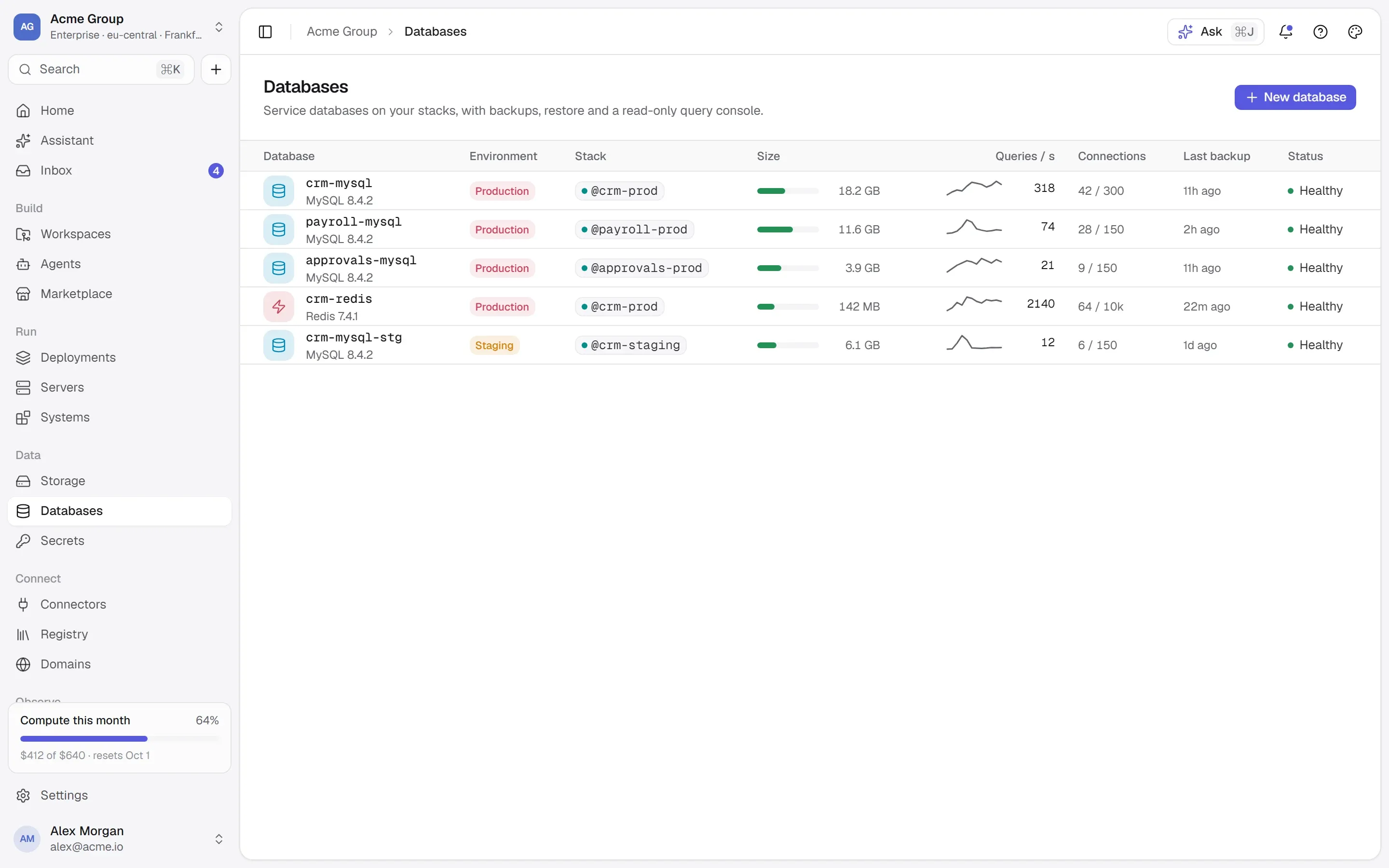
New database is one page: the engine and its version, then every variable it starts with — the user and the database to create on their own rows, each credential with where it comes from, the defaults you can change, the optional ones to tick — then its ports, what it keeps, and where it goes. Review and create shows the exact commands first.

  • What the platform fills in is filled in; what is optional is offered, unticked, with what it does.
  • Volumes follow the version — PostgreSQL 18 keeps its data in a new place, and the catalogue knows.
  • A suggested memory beside the field, never imposed: no limit unless you set one.
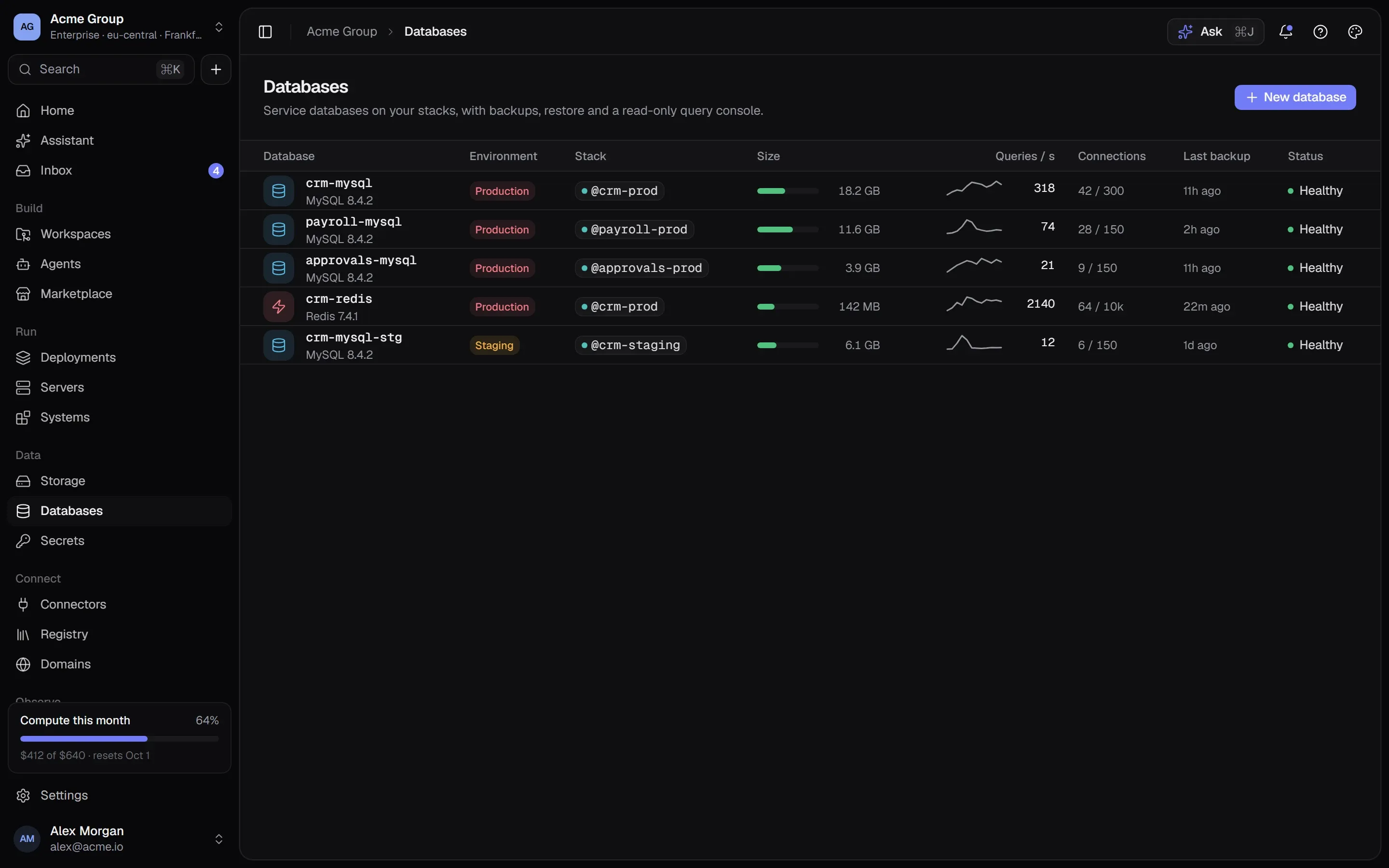
Databases: each engine with its version, size and backups.Databases: each engine with its version, size and backups.

02

Passwords handled so nobody copies them.

Each credential is generated, typed by you, or one of your organization’s shared secrets. A generated or typed one is kept as a secret of that database — encrypted, versioned, deleted with it — or saved as a shared secret any container can use. Connection details are shown per network with the password masked; revealing it is a permission, and recorded.

  • Apps get the password at deploy time by reference — never pasted into their configuration.
  • An engine reads its password once, on first start; the form says so, so a rotation never surprises you.
  • Engines without a login of their own (Memcached, OpenSearch, Cassandra) are never opened to the internet.
STRIPE_SECRET_KEYv4

•••••••••••••• encrypted · rotated just now

  • crm-apiv4
  • crm-workerv3older value
Deploy the 1 on v3

03

Backups into your own bucket, restores that take a copy first.

As many plans as you want: a dump taken inside the running database (PostgreSQL, MySQL, MariaDB, MongoDB, pgvector, TimescaleDB), or a copy of the folders any container keeps. On request, every few hours, daily or weekly, into a bucket and folder you choose, keeping as many as you say. Nothing is stopped to take one.

  • Restoring always takes a copy of what is there now — if it cannot, nothing is changed.
  • Import a dump made elsewhere into a bucket, then restore it like any other backup.
  • A public bucket is allowed and never quiet: every backup there is flagged, because it holds every password and record.
every 6 hdump · keep 4
acme-backupsprivate

backups/crm-mysql/

  • 2026-09-25 06:0018.4 MB
  • 2026-09-25 00:0018.3 MB
  • 2026-09-24 18:0018.1 MB
  • 2026-09-24 12:0018.1 MB

Restore takes a copy of what is there first

04

One database, several stacks.

A database joins any stack on the same server without a redeploy, and the apps there reach it by name. A Marketplace install can point a recipe at a database you already run instead of making a second one. Removing a stack leaves a borrowed database alone, and unlinking is refused while something still uses it — naming what.

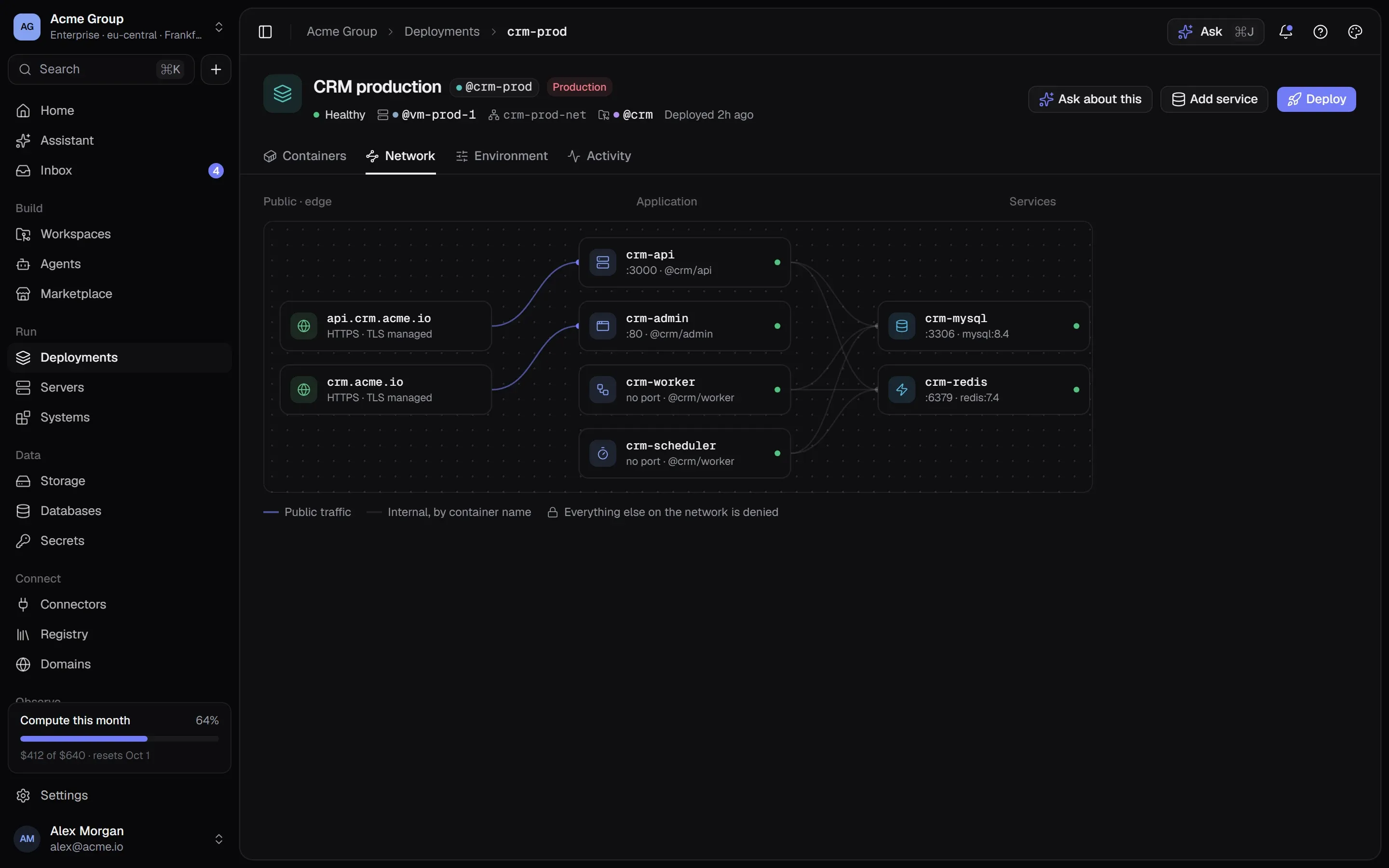
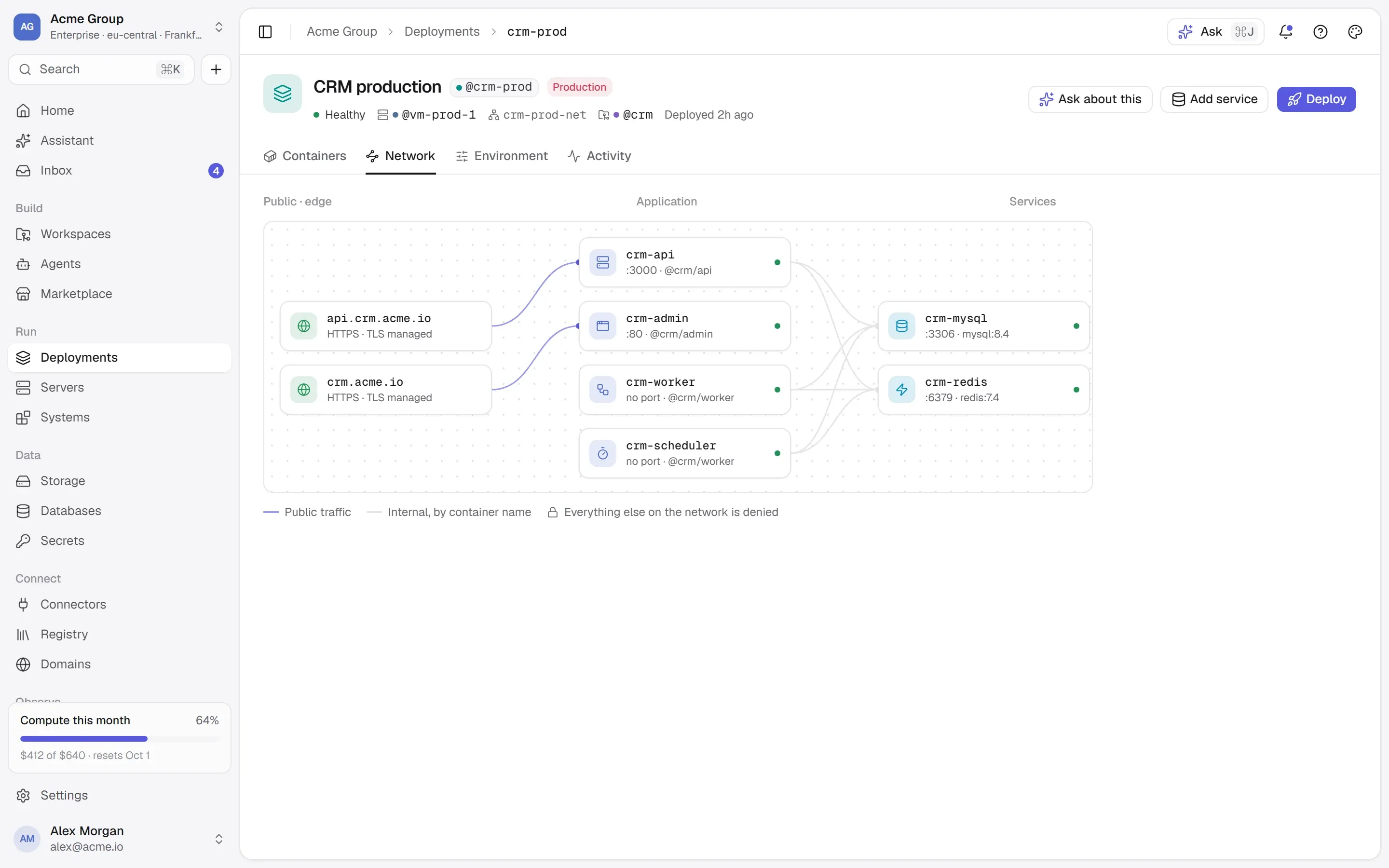
  • Drawn in both stacks on Deployments, with the network that connects them.
  • Apps get the host, port, user, password or URL as it is reached from their own network.
  • Its image, its internal ports and its data folders are fixed by the engine — so a change can’t strand your data.
A stack’s network map: two public addresses, four application containers and the MySQL and Redis services behind them on a private network.A stack’s network map: two public addresses, four application containers and the MySQL and Redis services behind them on a private network.

Works with

  • PostgreSQL
  • MySQL
  • MariaDB
  • MongoDB
  • Redis
  • Valkey
  • Elasticsearch
  • Meilisearch
  • Qdrant
  • ClickHouse
  • Neo4j
  • InfluxDB
Every integration →

/faq

Databases, answered plainly.

Something else? Write to [email protected] or use the contact page — a person answers.

Is this a managed database?

It is a database the platform runs for you in a container on your own server, from the engine’s official image: set up with its credentials as secrets, health-checked, backed up on your plans and restorable. There is no replication or failover across servers — a stack lives on one machine.

Where do backups go?

Into one of your organization’s own buckets, in a folder you choose, as the engine’s own dump or as a copy of the container’s folders. Backups cost what the bucket costs; there is no separate price.

Can I restore a dump from somewhere else?

Yes. Upload it into a bucket from the container’s Backups tab (or name one already there), and restore it like any backup — a copy of what is there now is taken first.

Which versions are there?

The ones in the catalogue, read from each image’s published build steps: for example PostgreSQL 18, 17 and 16; MySQL 8.4 LTS and 9.7; MariaDB 11.8 and 11.4. You can change the version later; the engine stays what it is.

Can I connect from my laptop?

Give the port the local exposure and reach it through an SSH tunnel, or the private exposure for your other servers in the same location. Opening a database to the internet is possible, and the review warns that anyone could then try its password.

/start

Postgres in a minute.

Request early access. A database costs nothing on top of the server it runs on; its backups cost what the bucket costs.

Quick links

Request early accessthe way in
Platform overvieweverything in one isolated cloud
Marketplaceapps, databases, Docker Hub, MCP
Pricingplans, usage, AI credits
Securityisolation, secrets, approvals, audit
Changelogwhat shipped, newest first
Talk to ussales, help, security, privacy

Appearance

Dark mode
Light mode
System mode
Moonlight palettesilver-white · moon blue · lavender grey · the default
Signal paletteindigo · the classic
Ember paletteorange · amber · crimson
Aurum palettegold · bronze · champagne
Clay paletteterracotta · rust · sand
Mocha palettecaramel · mocha · cream
Rosewood palettedusty rose · wine · blush
Sage palettesage · eucalyptus · oat
Tide palettesea teal · deep sea · seafoam
Slate palettesteel blue · slate · mist
Dusk palettelilac · mauve · slate blue
Indigo accent
Violet accent
Blue accent
Teal accent
Emerald accent
Amber accent
Orange accent
Rose accent
Graphite accent
Cool surface
Neutral surface
Warm surface
Midnight surface
↑↓ move↵ open⌘K or / anywhere on the site