Request early accessEarly access

/logs

Find what happened — and what it cost.

What every container printed, searchable in one place with secrets masked. The month so far, day by day, from the very lines the invoice will carry. Every change anyone made, in an audit log you can export.

  • Logs kept 72 hours
  • Usage equal to the invoice, to the cent
  • Audit log with CSV
crm-apilive · masked
  1. 09:41:02infoGET /v1/contacts 200 · 18 ms
  2. 09:41:03infoPOST /v1/contacts/import 202 · job ctj_8f2
  3. 09:41:03warnslow query 812 ms · contacts.search
  4. 09:41:04infoDATABASE_URL=mysql://crm:•••••••@crm-mysql:3306/crm
  5. 09:41:05infoworker picked ctj_8f2 · 1,380 rows

/observe

The answers are already written down.

Logs, usage and the audit log for everything you run — and runs: a trace of what an agent did, step by step, with its cost.

01

Every line, one search.

What every container prints is collected every minute into compressed chunks and kept for 72 hours. Search them all at once, with a volume chart, and narrow by level and by container. A line’s level is read from its words, since Docker does not know one.

  • Masked on the way out: password=… pairs, bearer tokens, and every secret name of your organization.
  • Bounded per container, per day and per search — and the page says what may be missing.
  • A container’s own Logs tab reads it live, straight from its server.
Logs · last 15 minutes · level: error
09:40:12  crm-api     error  POST /contacts/import 500 — batch 7 of 1409:40:12  crm-api     info   retrying batch 709:40:13  crm-worker  warn   STRIPE_SECRET_KEY=•••••• rejected by the API09:41:02  crm-api     info   POST /contacts/import 200 — 1,380 rows # secrets masked on the way out — the stored line keeps its shape
02

The month so far, the way it will be invoiced.

Usage shows one month by area and by day, next to the month before, with every line as the invoice will carry it. It is the invoice’s own computation — monthly caps, allowances and the pooled traffic line applied exactly as the invoice applies them — so its total equals Billing’s estimate to the cent.

  • What each day cost, which adds up to the month — no second pricing path.
  • A spending alert as a meter, and what the month comes to at this pace.
  • Any month since your organization began; the current one runs to now.

September so far

$128.42

Sep 25 · $5.56

Example
  • Add-ons
  • Servers
  • Object storage
  • Everything else

03

What each server is doing.

Each server has charts of CPU, memory, disk and outbound traffic from an hour to thirty days, and the traffic it sent this month against the allowance it earned. Allowances are pooled across your servers, and only traffic beyond the whole pool is charged — worked out on the whole month, never day by day.

  • Samples every two minutes; hourly figures kept for more than a year of invoices.
  • Inbound traffic and traffic on the private network are free.
  • A server that can’t be read says so, instead of showing zero.
vm-prod-1 · usage · last 24 hours
CPU      34%    ▂▂▃▃▅▆▅▃▂▂▃▄Memory   57%    2.3 of 4 GBDisk     41%    33 of 80 GBLoad     0.42   0.51   0.47 Sent this month   612 GBEarned toward the pool   1,024 GB — nothing over, $0.00

04

Every change, on the record.

The audit log records every change in the organization — who, what, from where, and whether it was allowed — filterable by person, kind of action, result and time, and exportable as CSV. What our staff do on your behalf appears in your log too, labelled as staff. Denied permission checks are recorded automatically.

  • Filter by actor: a person, an API key, the system — or staff.
  • Export any view as CSV.
  • 30 days on Free; unlimited on Enterprise; seven years with the extended-retention add-on.

05

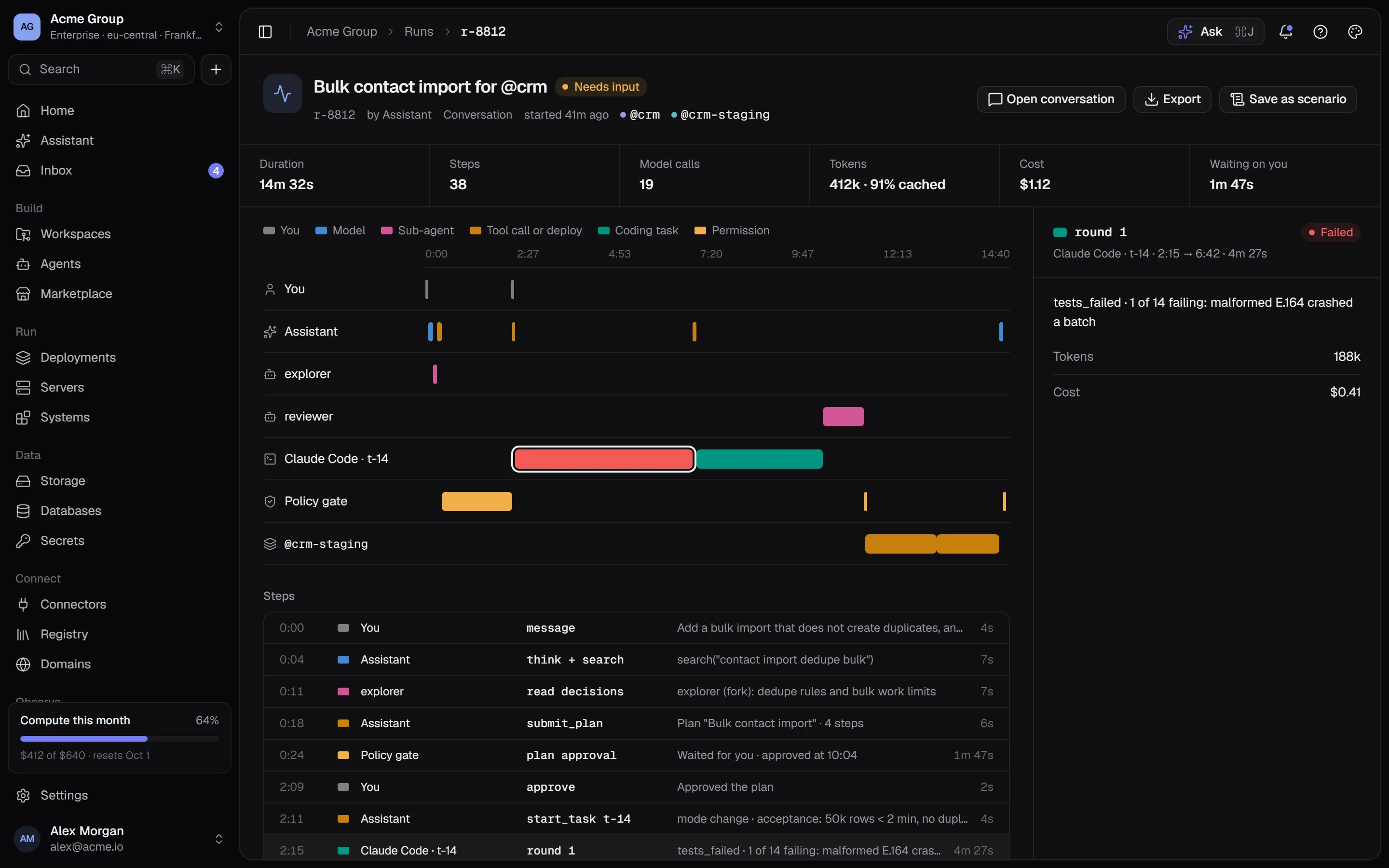
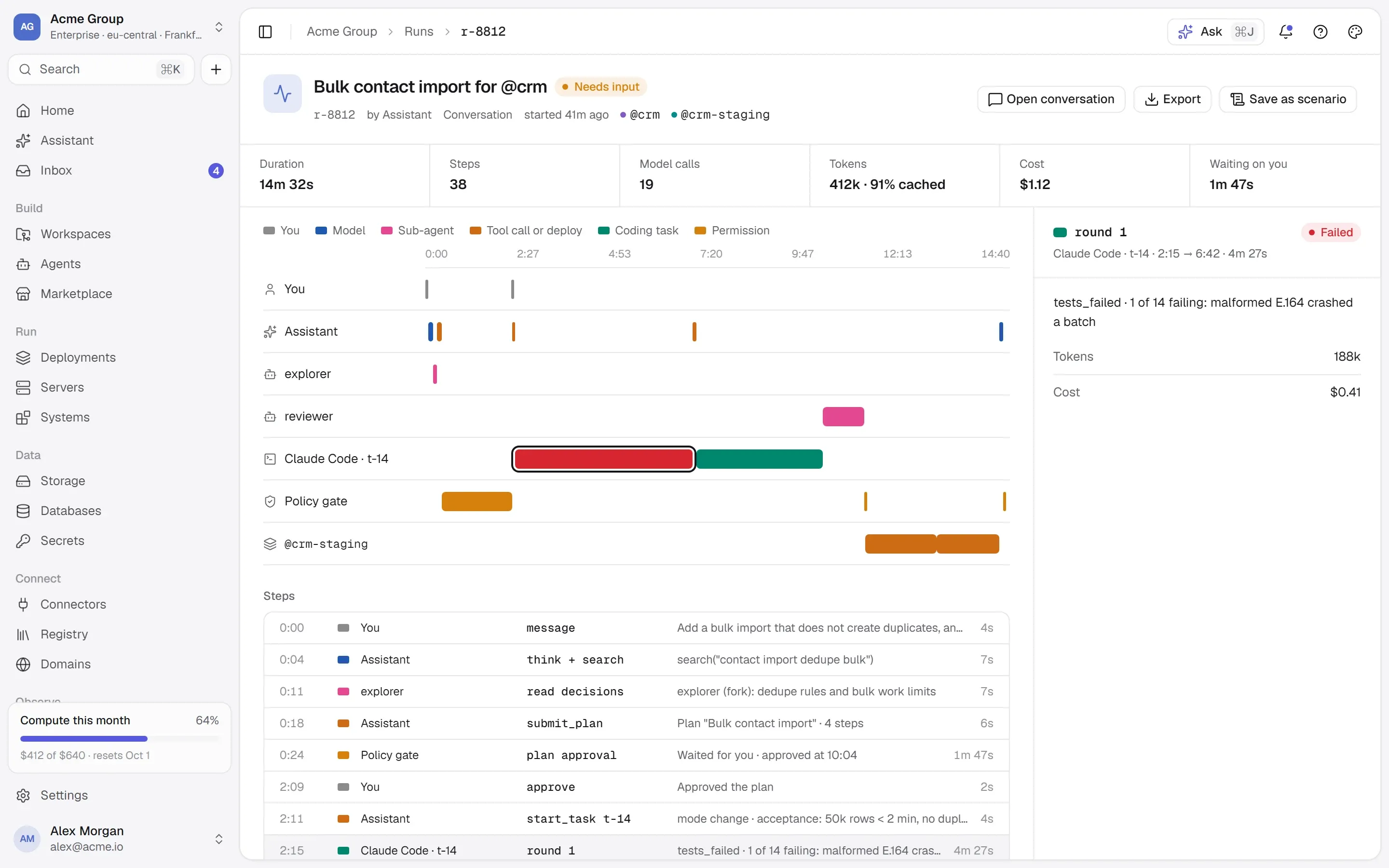
Runs you can trace.

Every run of the assistant and your agents is a trace: who acted, which tool was called, what waited for a person, and what each step cost in tokens and dollars — down to the coding round that failed.

  • Lanes for you, the assistant, sub-agents, tools and the policy gate.
  • Time spent waiting on a person, shown as such.
  • Tokens, cache and cost per step.
A run trace: lanes for the user, the assistant, sub-agents, the coding agent, the policy gate and a staging deploy, with duration, tokens and cost.A run trace: lanes for the user, the assistant, sub-agents, the coding agent, the policy gate and a staging deploy, with duration, tokens and cost.

/faq

Logs and usage, answered plainly.

Something else? Write to [email protected] or use the contact page — a person answers.

How long are logs kept?

72 hours of stored lines, searchable across the organization. A container’s own Logs tab also reads further back from its server, as far as Docker still holds.

Can I send logs somewhere else?

Not from the platform yet. Your containers can of course ship their own logs anywhere they like.

Will Usage match my invoice?

Exactly. Usage is computed by the same code that builds the invoice, and the test suite checks the two agree to the cent.

Is there alerting?

A crashed container, a failed deploy, a failed backup or a server out of reach notifies the people who can act — in the app, and by email if they chose it. A spending alert emails billing contacts at the levels you set.

/start

Know what happened.

Logs, usage and the audit log come with every organization. Request early access to start.

Quick links

Request early accessthe way in
Platform overvieweverything in one isolated cloud
Marketplaceapps, databases, Docker Hub, MCP
Pricingplans, usage, AI credits
Securityisolation, secrets, approvals, audit
Changelogwhat shipped, newest first
Talk to ussales, help, security, privacy

Appearance

Dark mode
Light mode
System mode
Moonlight palettesilver-white · moon blue · lavender grey · the default
Signal paletteindigo · the classic
Ember paletteorange · amber · crimson
Aurum palettegold · bronze · champagne
Clay paletteterracotta · rust · sand
Mocha palettecaramel · mocha · cream
Rosewood palettedusty rose · wine · blush
Sage palettesage · eucalyptus · oat
Tide palettesea teal · deep sea · seafoam
Slate palettesteel blue · slate · mist
Dusk palettelilac · mauve · slate blue
Indigo accent
Violet accent
Blue accent
Teal accent
Emerald accent
Amber accent
Orange accent
Rose accent
Graphite accent
Cool surface
Neutral surface
Warm surface
Midnight surface
↑↓ move↵ open⌘K or / anywhere on the site