Request early accessEarly access

/agents

Agents are folders of markdown — with grants.

An agent is what it reads, what it may touch and what wakes it: AGENT.md, its skills and rules, a model, the tools it is granted one by one, and its triggers. It versions like code, because it is files.

  • Worker · harness · workflow
  • Grants tool by tool
  • Drafts, then waits
@inbox-triageworkerclaude-haiku-4-5
  • AGENT.mdwhat it is for, how it decides
  • skills/classify.mdbilling · bug · sales · spam
  • skills/draft-reply.mdtone, sign-off, what never to promise
  • rules.mdnever send — draft and wait

Grants

  • @gmailread · draft
  • @crm-agentcontacts.search · contacts.create

Wakes on

a new email to support@ · drafts, then waits for a person

“Invoice INV-2291 charged twice”billingreply drafted · contact updatedwaiting for a person

/how-agents-work

Build them like code, grant them like people.

An agent calls the same tools your people do — your systems, the Registry, the ledger — through the same gate, with the grants you give it.

01

Worker, harness, workflow.

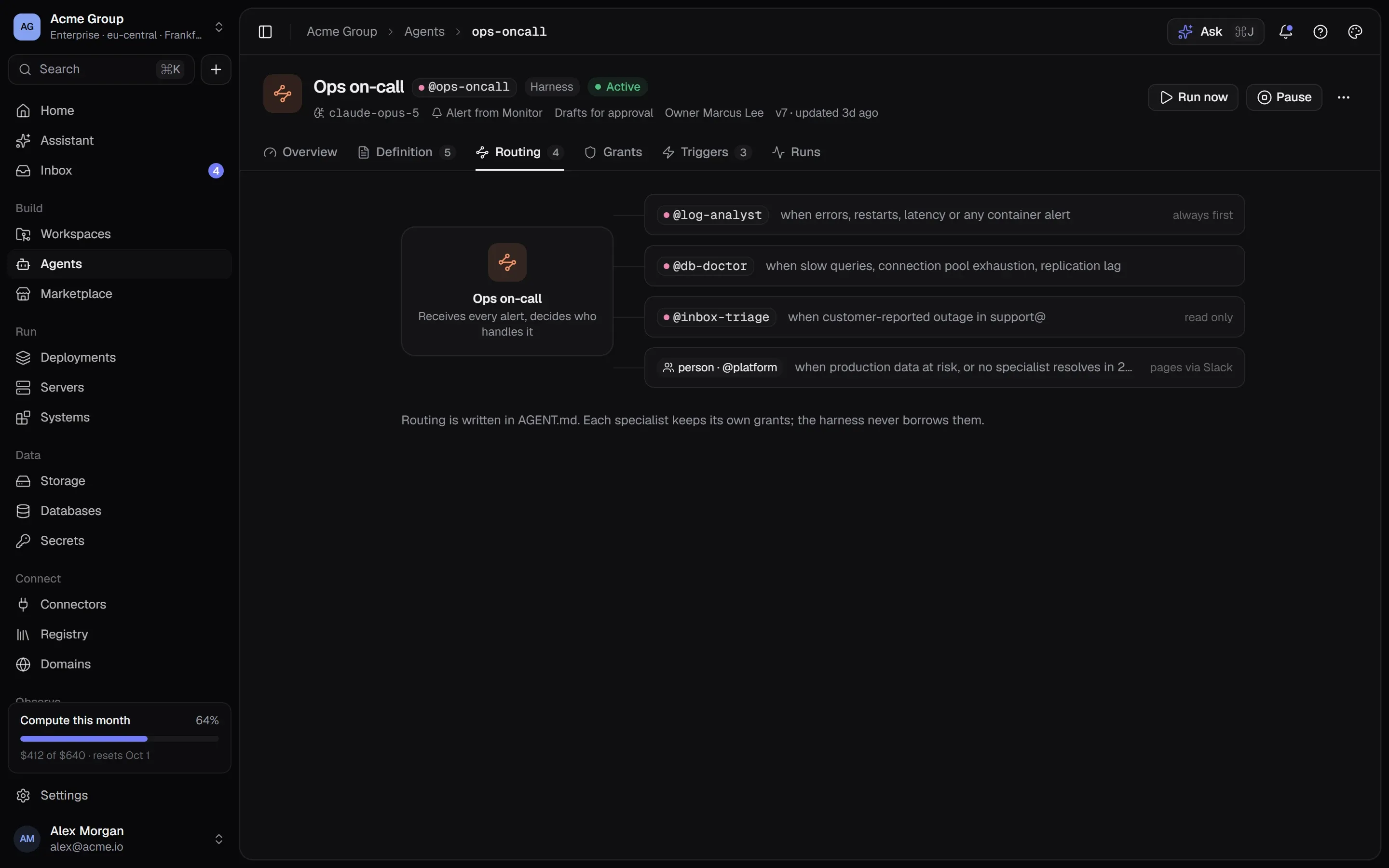
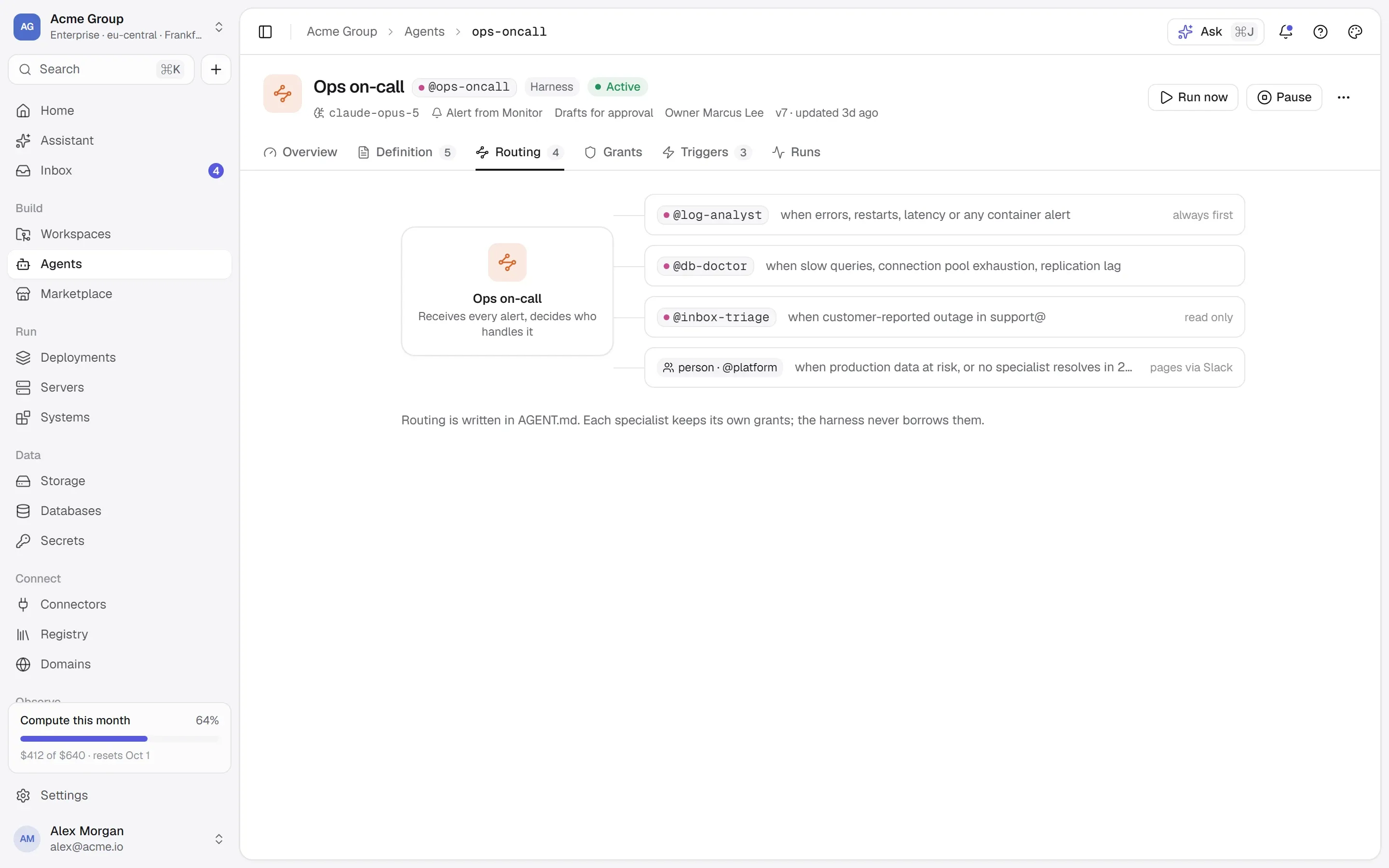
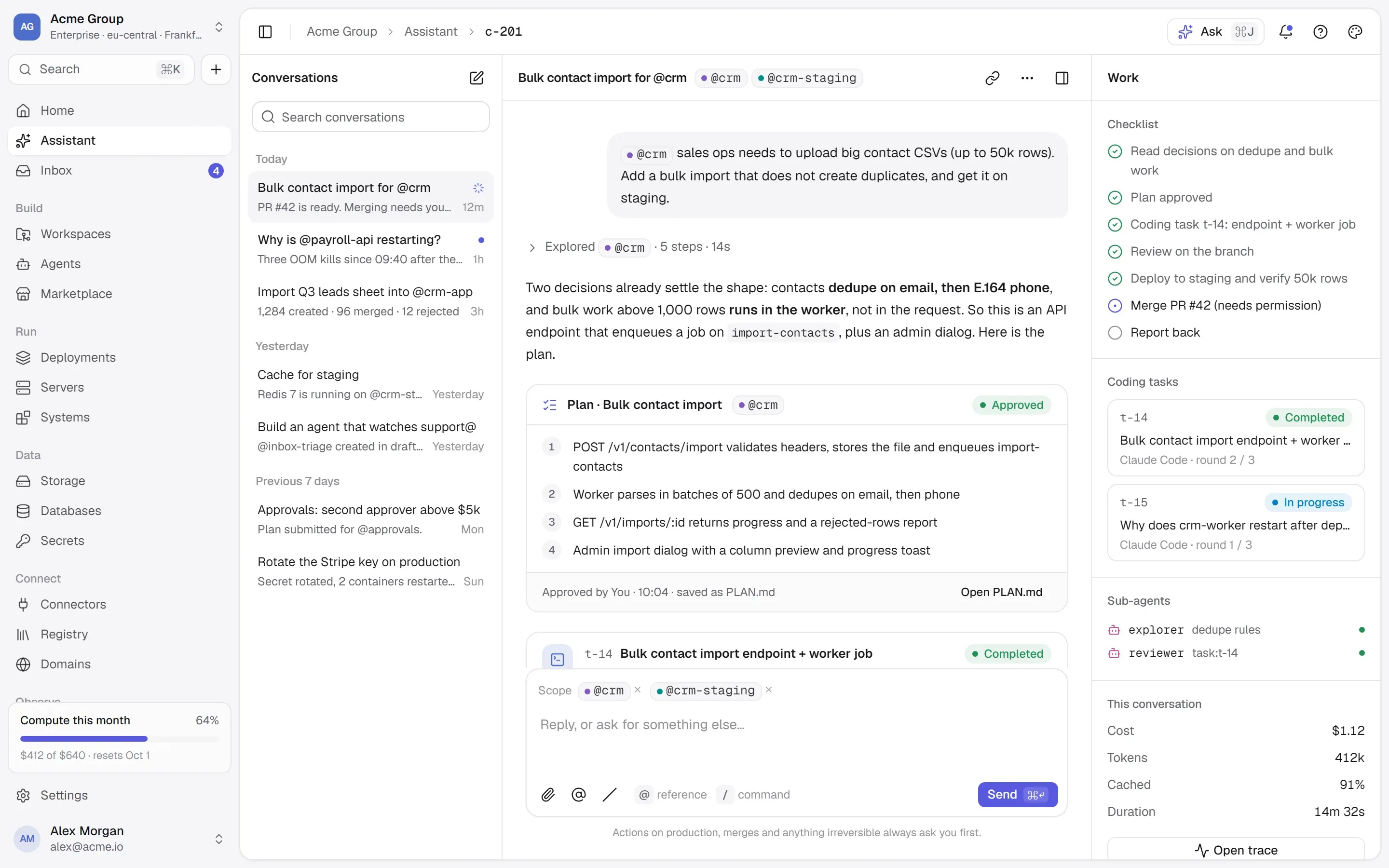
A worker does one job — triage an inbox, reconcile payments, write the Monday digest. A harness routes work to other agents, each keeping its own grants: the harness never borrows them. A workflow is a harness with an ordered plan — test, staging, verify, production — so workflows need no separate engine.

  • Workers are small and exact.
  • A harness calls other agents, three deep at most, so nothing loops.
  • A workflow’s gates are approvals.
An agent harness called Ops on-call routing alerts to a log analyst, a database doctor, an inbox triage agent and, for production data, a person.An agent harness called Ops on-call routing alerts to a log analyst, a database doctor, an inbox triage agent and, for production data, a person.

02

Grants, tool by tool.

An agent can call only what it was granted: read tools per system, and every tool that writes, destroys or reaches outside one by one — never a wildcard. Granting a write needs its own permission, and you can only grant what you could do yourself. On top of its grants, an agent can never do what its owner cannot.

  • Anything not granted is refused before your own permissions are even consulted.
  • Grant only what you could do yourself.
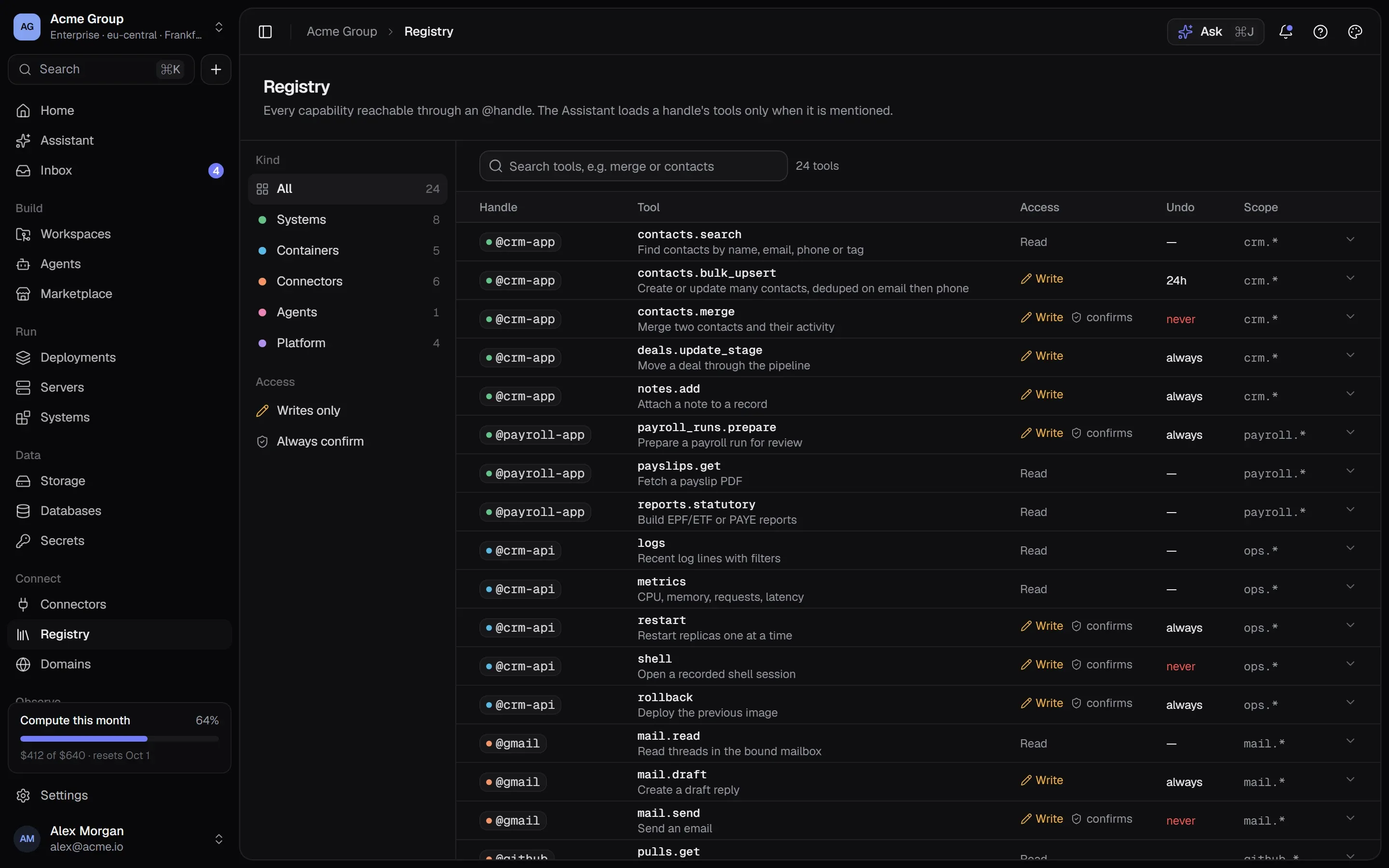
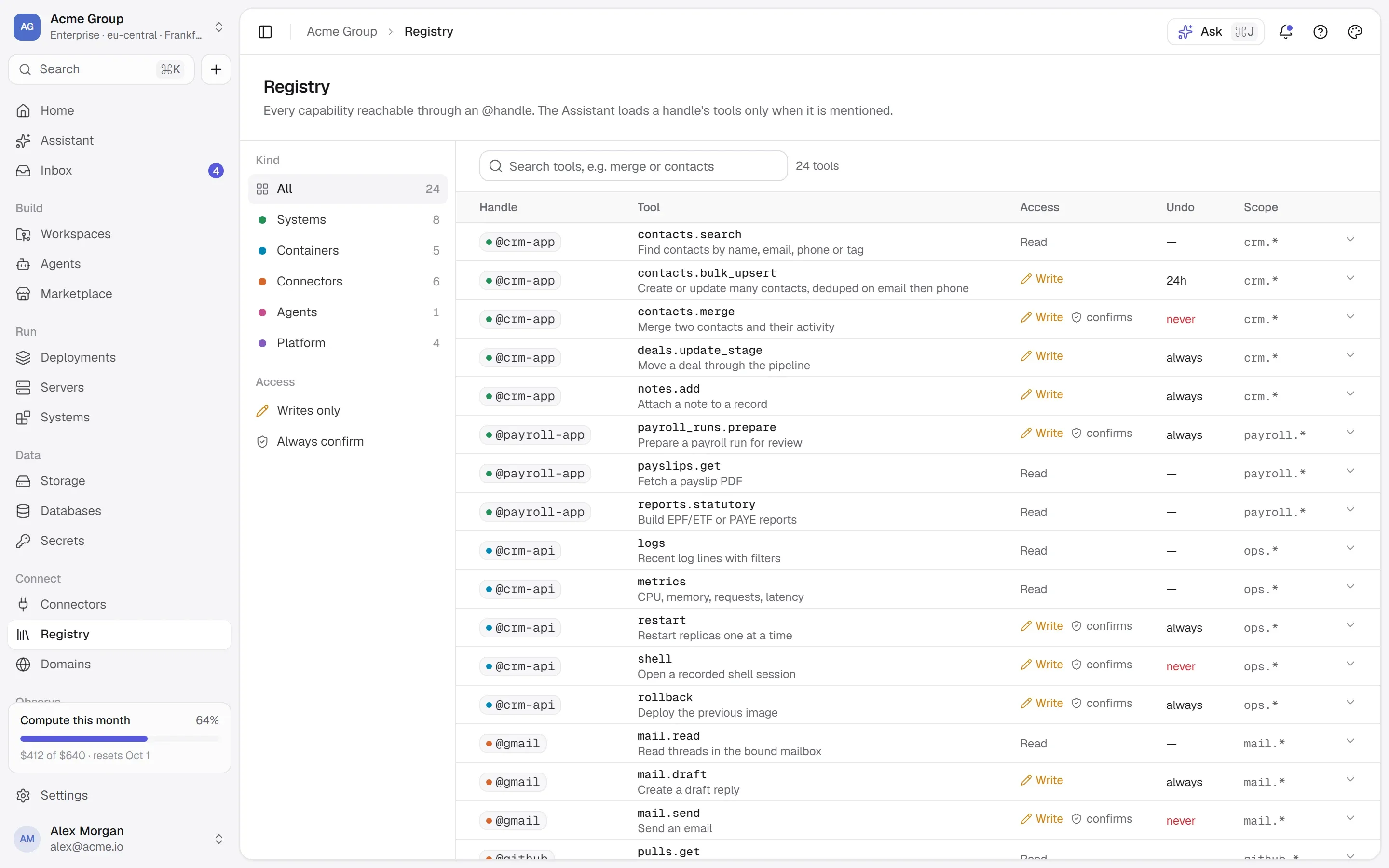
  • Grants are picked from the Registry, each tool with its class.
The Registry: every tool of every system, marked as reading, writing or destructive, with recent calls.The Registry: every tool of every system, marked as reading, writing or destructive, with recent calls.

03

Triggers — and what they may do.

An agent wakes on a schedule, a signed webhook, a platform event — a crash, a failed deploy, a failed backup — a mention, or another agent calling it. Anything that leaves your company is drafted and waits for a person unless the owner chooses otherwise and the organization’s policy allows it.

  • Schedules use the same shape as a server’s size schedule.
  • Webhooks are signed; their payload is treated as untrusted input.
  • “Send this reply to 3 customers?” — the draft is the approval.

04

Tested before it is switched on.

A new agent starts as a draft, and it cannot be activated until a test run of its current files has finished. A test run executes reads and shows what it would have written, destroyed or sent — without doing any of it. Changing its files or grants sends it back for another test before the change takes effect.

  • “Preview — would call … with …” instead of a real write.
  • A trigger that keeps failing pauses the agent and tells its owner.
  • Budgets per run and per day, under the organization’s own cap.

05

Runs you can trace.

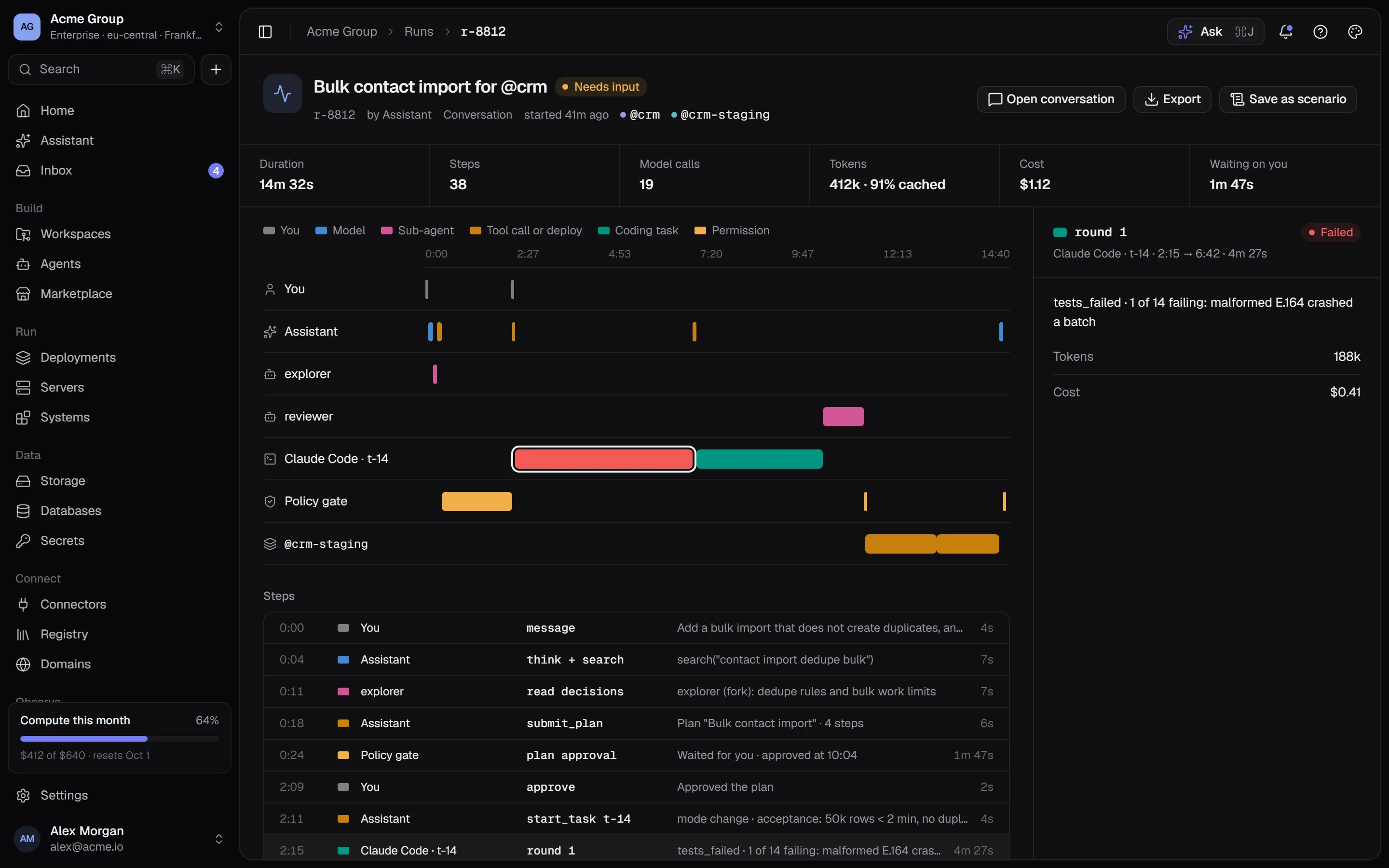
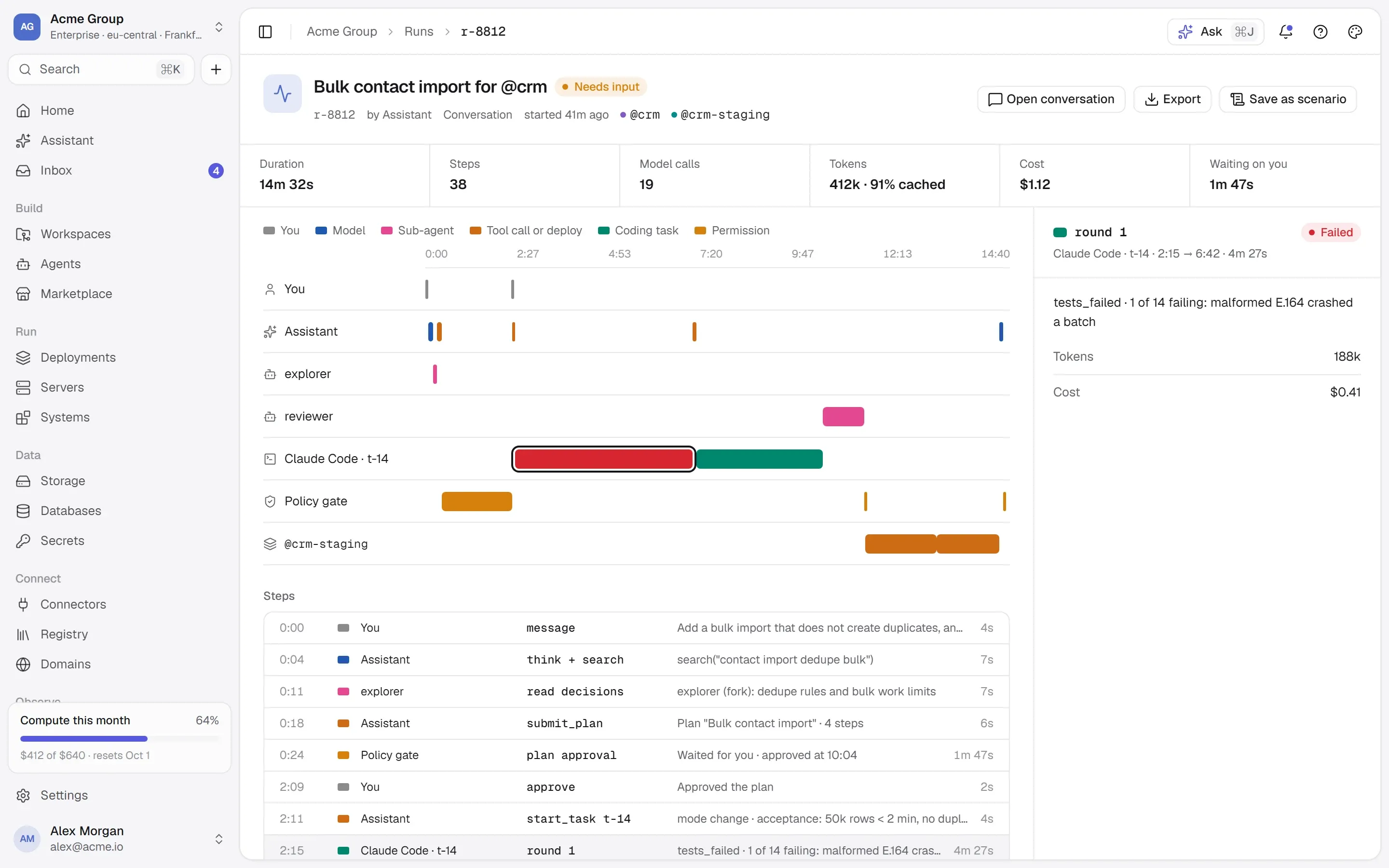
Every run is a trace: what woke it, what it read, each tool call with its decision and outcome, what waited for a person, and what it cost. The calls are rows in the same ledger your people’s calls are in.

  • Lanes per agent and sub-agent, the gate, and the people it waited for.
  • One history for people and agents.
  • Tokens and cost, step by step.
A run trace: lanes for the user, the assistant, sub-agents, the coding agent, the policy gate and a staging deploy, with duration, tokens and cost.A run trace: lanes for the user, the assistant, sub-agents, the coding agent, the policy gate and a staging deploy, with duration, tokens and cost.

/faq

Agents, answered plainly.

Something else? Write to [email protected] or use the contact page — a person answers.

What do agents stand on?

The same pieces as the rest of the platform: systems with their tools, the Registry, the ledger of calls, secrets and permissions.

Can an agent send email or messages on its own?

Only if its owner chooses “acts” and the organization’s policy allows it. By default anything that leaves the company is drafted and waits for a person to approve it.

What are connectors?

Third-party MCP servers bound to an account — a mailbox, a chat workspace, a payments account — behind the same gate as your own systems. The platform sends the connector’s own token, never the caller’s.

Which model does an agent use?

The one its files name, from the models your organization allows, paid from prepaid AI credits with per-run and per-day caps.

/start

The tools come first.

Publish your systems and your agents call exactly those tools, through the same gate. Request early access to start.

Quick links

Request early accessthe way in
Platform overvieweverything in one isolated cloud
Marketplaceapps, databases, Docker Hub, MCP
Pricingplans, usage, AI credits
Securityisolation, secrets, approvals, audit
Changelogwhat shipped, newest first
Talk to ussales, help, security, privacy

Appearance

Dark mode
Light mode
System mode
Moonlight palettesilver-white · moon blue · lavender grey · the default
Signal paletteindigo · the classic
Ember paletteorange · amber · crimson
Aurum palettegold · bronze · champagne
Clay paletteterracotta · rust · sand
Mocha palettecaramel · mocha · cream
Rosewood palettedusty rose · wine · blush
Sage palettesage · eucalyptus · oat
Tide palettesea teal · deep sea · seafoam
Slate palettesteel blue · slate · mist
Dusk palettelilac · mauve · slate blue
Indigo accent
Violet accent
Blue accent
Teal accent
Emerald accent
Amber accent
Orange accent
Rose accent
Graphite accent
Cool surface
Neutral surface
Warm surface
Midnight surface
↑↓ move↵ open⌘K or / anywhere on the site